Tracking Several Brokerage Accounts Without Mixing Them Up
Keep one ledger per broker, then roll them up into a single portfolio view. This guide shows the by-hand method with a worked two-account example, and how MetisTrades separates and combines accounts.

What it is and why it matters
Most traders end up with more than one brokerage account. A taxable account at one broker, an IRA at another, maybe a small account opened for a specific strategy. Each one has its own cash balance, its own share lots, its own fills and fees.
Multi-account tracking means two things at once. First, keeping each broker's activity in its own ledger, so a trade that happened at Broker A is never mixed with a trade that happened at Broker B. Second, being able to add those ledgers together when you want to know how the whole portfolio did.
Those two goals pull against each other if you are careless. The temptation is to dump every fill into one long list and sort by date. That gives you a combined total quickly, and it quietly destroys everything that depends on account boundaries.
Here is why the boundary matters. Suppose you sell a cash-secured put on XYZ in your IRA and, in the same month, sell a covered call on XYZ in your taxable account. A cash-secured put is a short put backed by enough cash to buy the shares if assigned. A covered call is a short call sold against shares you already own. In a single merged list, those two XYZ rows look like legs of one position. They are not. They are separate obligations, backed by separate cash, in separate tax environments. If your records ever let the IRA put pair up with the taxable call, every number downstream is wrong: the matched profit or loss, the share cost basis, the holding period, the lifecycle view.
The same problem appears with share matching. FIFO — first in, first out — treats the earliest acquired shares as the first sold. FIFO only makes sense inside one account, because a sale at Broker B cannot consume shares sitting at Broker A.
And it matters for tax. A taxable account and an IRA are not interchangeable. A realized gain in one is a reportable event; in the other it is not. Any report you build that cannot tell you which account produced a number is a report you cannot use.
So the rule for the rest of this guide is simple: every row names the account it happened in, and no row ever moves between accounts. Combining comes last, as a sum, never as a merge.
How to track it by hand
You need two sheets. A Ledger sheet where every transaction lands, tagged with its account. And a By account sheet that adds up the ledger one account at a time. The second sheet is derived entirely from the first — you never type a number into it.
The Ledger sheet
Columns: Date, Account, Symbol, Description, Amount, Realized option P/L.
Amount is cash movement from your point of view: positive when cash comes in, negative when cash goes out. Selling an option to open collects a credit, so it is positive. Buying it back pays a debit, so it is negative.
Realized option P/L stays blank until a position actually closes. When it closes, you put the whole lifetime profit or loss of that position on the closing row. That keeps a closed result in exactly one place and stops you double-counting the opening credit as profit while the trade is still open.
Here is a two-account month with two positions, one in each account.
| Date | Account | Symbol | Description | Amount | Realized option P/L |
|---|---|---|---|---|---|
| 2026-01-05 | Broker A IRA | XYZ | Sell to open 50 put | 149.35 | |
| 2026-01-06 | Broker B taxable | ABC | Sell to open 35 covered call | 89.35 | |
| 2026-01-23 | Broker A IRA | XYZ | Buy to close 50 put | -30.65 | 118.70 |
| 2026-02-20 | Broker B taxable | ABC | 35 call expired | 0 | 89.35 |
Walk the rows. On 5 January you sold a 50-strike put on XYZ in the IRA and collected 149.35 after costs, so Amount is +149.35 and the realized column stays empty — the position is open. On 6 January you sold a 35-strike covered call on ABC in the taxable account for 89.35. Different account, different symbol, and nothing about it touches the XYZ row.
On 23 January you bought the XYZ put back for 30.65, so Amount is −30.65. That closes the position, so the realized column gets filled in: 149.35 − 30.65 = 118.70. On 20 February the ABC call expired worthless. No cash moves at expiration, so Amount is 0, and the realized column takes the full credit you keep: 89.35.
Combined net cash is the sum of the Amount column: 149.35 + 89.35 − 30.65 + 0 = 208.05. Combined realized profit and loss is the sum of the realized column: 118.70 + 89.35 = 208.05.
Those two totals match here, and it is worth understanding why rather than assuming it always happens. Both positions are closed and both were pure option trades with no share movement, so every dollar of cash that arrived is also a realized result. In a month with an open position, an assignment, or a share purchase, the two columns will not agree — net cash includes money tied up in things that have not finished yet.
The By account sheet
One row per account, and both columns are formulas. Using {r} for the row number:
- Net cash:
=IF(A{r}="","",SUMIF(Ledger!$B:$B,A{r},Ledger!$E:$E)) - Realized P/L:
=IF(A{r}="","",SUMIF(Ledger!$B:$B,A{r},Ledger!$F:$F))
Each SUMIF reads the Account column on the Ledger sheet, keeps only the rows whose account name matches this row, and totals the matching cells. Nothing is retyped, so the per-account figures cannot drift away from the ledger.
| Account | Net cash | Realized P/L |
|---|---|---|
| Broker A IRA | 118.70 | 118.70 |
| Broker B taxable | 89.35 | 89.35 |
| All accounts | 208.05 | 208.05 |
Broker A IRA nets 149.35 − 30.65 = 118.70 in cash and the same 118.70 realized. Broker B taxable nets 89.35 and 0, so 89.35 in cash and 89.35 realized. Adding the two account rows gives 118.70 + 89.35 = 208.05 in both columns, which is exactly what the Ledger sheet totals said.
That agreement is the check. If the By account rows do not add up to the Ledger totals, you have an account name that is misspelled, has a stray space, or is missing from the By account sheet entirely. Run that check every time you add rows.
The spreadsheet below already contains this worked example and both SUMIF formulas, so you can replace the four rows with your own and keep the structure.
Download the template: Multi-account ledger (.xlsx). It opens in Excel, and in Google Sheets via File → Import. The worked example from this guide is already filled in, and the formulas carry down into the blank rows.
Habits that keep it honest
Use one account name per broker portfolio and write it identically every time — "Broker A IRA", not sometimes "Broker A" and sometimes "A IRA". Add an account row to the By account sheet the day you open the account, not the first time you trade in it. And never edit the Account cell on an existing row to make a total look tidier. If the account is wrong, the row was entered wrong; fix it at the source and re-check the totals.
Where manual tracking breaks down
The two-sheet method survives four rows. It starts to strain somewhere around four hundred.
Name drift. SUMIF matches on text. "Broker B taxable" and "Broker B Taxable " with a trailing space are two different accounts as far as the formula is concerned, and the symptom is a combined total that no longer equals the sum of the account rows. You will find it eventually, but only if you run the check.
Same symbol, two accounts. The moment you hold XYZ in both accounts, sorting the ledger by symbol stops being safe. You cannot match an opening trade to a closing trade by symbol alone any more; you have to match on symbol and account, by eye, every time.
Partial fills. One order that fills in three pieces produces three rows. All three belong to the same position in the same account, and you have to remember that when you compute the realized figure on the closing row.
Rolls. A roll closes one option leg and opens a replacement with a different strike, expiration, or both. By hand, that is a closing row plus an opening row, and the link between them lives only in your head. Across several accounts, with the same underlying rolled in two of them, the chain is easy to lose.
Assignments. An assignment obliges the option seller to fulfil the contract. A short put assignment buys shares at the strike; a short call assignment sells them. One assignment produces a share lot in one specific account, and that lot can only be consumed by sales in that same account. Tracking share lots per account by hand is where most spreadsheets quietly stop being accurate.
Wheel sequences. The wheel runs a cash-secured put, takes shares on assignment, sells covered calls against them, and may end when the shares are called away. Following that sequence by hand is work in one account. In three accounts, with two of them running the wheel on the same ticker, it is a reconstruction project.
Corrections. A broker amends a fee, cancels a trade, or restates a transfer. You now need to find the affected row, change it, and re-verify that every account total still reconciles to the combined total.
None of these is hard. All of them are easy to get slightly wrong, and a slightly wrong account boundary is worse than no boundary at all, because you will trust the number.
How MetisTrades does it
MetisTrades uses the same shape as the spreadsheet: a container per broker portfolio, and a combined read scope on top. Trading-account management and portfolio switching are Pro features, available to active subscribers, trial members, lifetime members and legacy lifetime users.
Create one trading account per broker portfolio
A trading account is the container that separates transactions, positions, cash, overrides and account-specific settings. It usually represents one brokerage account, such as a taxable account or an IRA.
You manage them from the Trading Accounts card in Account Settings, reached from the user menu. The card describes itself as "Manage your trading accounts to track positions separately by broker". Choose Add Account to open the Create Trading Account dialog, which asks for Account Name (its example is "Robinhood IRA"), Broker — initially set to Robinhood, with choices including Schwab, TD Ameritrade, Fidelity, E*TRADE, Webull, Tastytrade, Interactive Brokers and Other — and an optional Description (its example is "Tax-advantaged retirement account"). Create stays unavailable until the account has a name.
In the card itself, look at what each row carries: the name, the broker type, the description when you entered one, a Default badge on the default account, a drag handle for reordering, an edit control, and a delete control that appears only when more than one account exists.
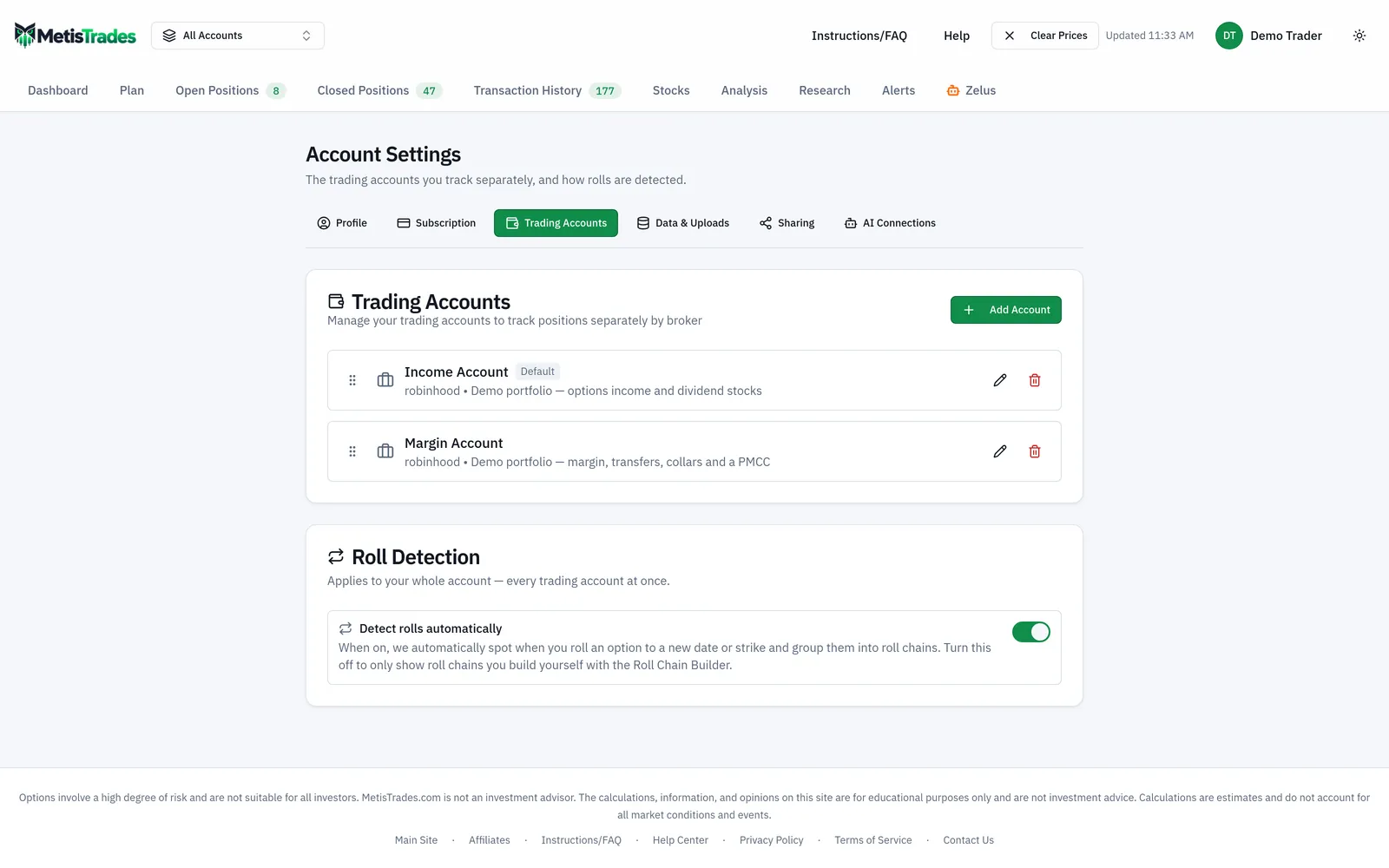
Two accounts can share a broker type. Give them distinct names or descriptions so you can tell them apart in the list and in the switcher. Dragging rows changes presentation order only — it does not combine accounts or move transactions between them.
Switch between one account and all of them
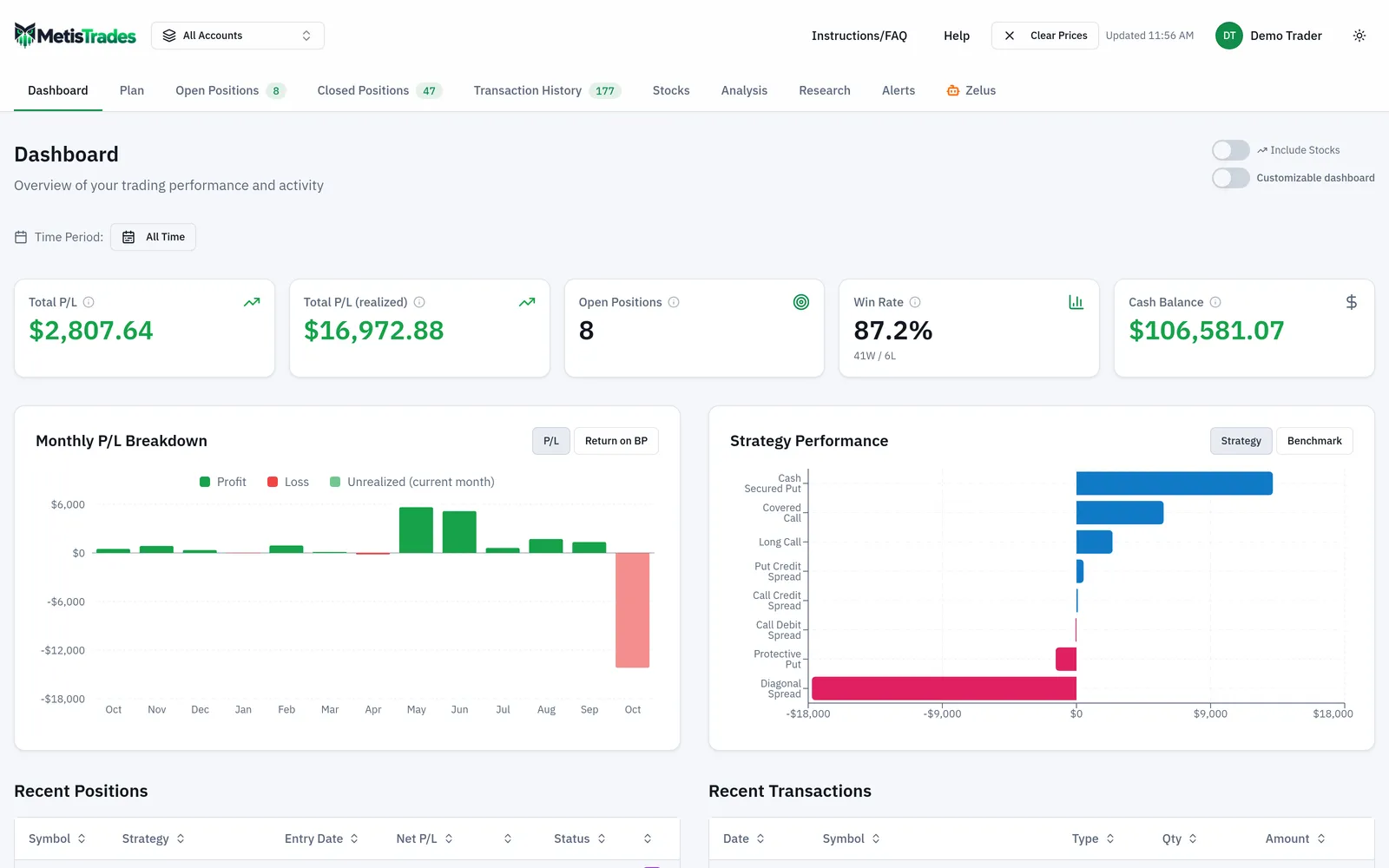
The desktop header holds the account switcher, labelled Select a trading account. It shows Trading Accounts, your account names, the (default) marker, and — once you have more than one account — All Accounts, with the number of accounts in the label. Your selection is remembered in your browser; if a saved selection is no longer valid, MetisTrades falls back to the default account, then to the first account.
All Accounts is a combined viewing scope, not another trading account. It gathers data from your existing accounts while preserving the account that owns each row. In the screenshot below, note the switcher at the top showing that combined scope is active.
What combines, and what stays separate
In All Accounts mode, MetisTrades loads the transactions in the combined scope, then builds positions separately for each account and concatenates the results. That is the step that matters: identical symbols and contracts in different accounts are never matched together. The combined summary is then calculated from those separately built positions.
What you see combined: the transaction list contains rows from all accounts; open- and closed-position lists contain positions from all accounts; the summary is calculated across those positions; stock holdings get a global symbol rollup for display, with an additional per-account breakdown still available; effective cash can be combined across accounts; and filters and searches work across the combined rows.
Open Positions, Closed Positions and Transaction History add a trading-account column so same-symbol activity can be told apart, and Transaction History also offers Trading Account as a grouping choice in All Accounts mode. Roll Analysis and wheel views keep account groups separate. Margin Analysis can show a per-account breakdown.
These are built or resolved per account and never cross the boundary: option positions and FIFO matching; manual groupings and leg splits; roll chains and roll overrides; wheel-cycle detection and wheel overrides; stock holdings by account; tags and notes; uploaded files and account data management; brokerage links and sync status; and broker cash and buying-power snapshots. A cash-secured put assignment in one account cannot be linked to a covered call in another merely because the symbol matches.
Actions that need one account selected
All Accounts is safest for reading and comparison. Anything with an ambiguous destination requires a specific account first.
- In Transaction History, Add Transaction and the row edit and delete controls appear only in a specific-account view.
- Group as Position is disabled in All Accounts mode, with the explanation "Select a specific account to group transactions".
- CSV upload is tied to a specific account. The Trading Account Data uploader in Account Settings still works while All Accounts is selected, and the file lands in the account chosen by that section's own picker — but it skips the review steps: no duplicate review, no AI mapping review, and no prompt when a file uploaded as Other broker (AI-assisted) turns out to match a supported layout. A file that would need one of those review steps is not imported. When duplicate review was what it needed, the upload still reports Upload Successful with Processed 0 transactions, and that count is the only sign nothing was added.
- Broker transaction sync is account-specific. Each trading account links to one brokerage account, and the link remembers which brokerage connection it came through, so two trading accounts can be fed by two different logins at the same brokerage. The header sync control is hidden in All Accounts mode even if one of the accounts is linked.
- Public sharing is account-specific: you choose an account before choosing Create Link. A share represents exactly one account, and a viewer cannot switch into your other accounts.
How to read the results
A combined total in MetisTrades means the same thing as the "All accounts" row on your By account sheet: the sum of separately built per-account books. It does not mean your accounts were merged into one. Counts and portfolio-level totals span all the selected account data without losing account ownership.
When the same symbol appears more than once in a combined list, that is usually correct — the symbol exists in several accounts. Use the trading-account column, or group Transaction History by Trading Account, to tell the rows apart.
Effective cash is the displayed cash figure, and it deserves a careful read in combined mode. Cash is resolved per account first. For a linked account with an available broker balance, that broker figure contributes; otherwise that account's imported ledger contributes. So an All Accounts cash number can have a broker, ledger or mixed source. A mixed figure contains broker-backed contributions from some accounts and ledger contributions from others, and broker balances and imported ledger balances can have different freshness and coverage.
The global stock rollup combines a symbol across accounts for display. That is convenient for seeing total exposure to a name. It is not the view to use for basis or ownership questions — the per-account stock breakdown is the safer one, because basis and lots belong to a specific account.
Lifecycle views carry a boundary you should read into them. A roll chain links rolled positions within an account. A wheel cycle links a put, shares, calls and disposition within an account. Wheel cycles are detected separately for every account, so if you genuinely ran one side of a wheel in one account and the other side elsewhere, MetisTrades will not and should not stitch them together.
Finally, the standing caveat. All position, cash, P/L and performance figures derived from imported transactions are estimates, and they depend on the completeness and accuracy of the data assigned to each account. Missing opening trades, transfers, multipliers, assignments or fees change what the derived numbers say. Tax figures are estimates from your imported transactions, not tax advice, and not a substitute for your broker's 1099-B.
Common mistakes
- Moving a row to a different account so the totals balance. Fix: leave the row in the account where the trade happened and correct the underlying import — a tidy total built on a false account boundary is worse than an obvious mismatch.
- Expecting a put in one account to pair with a call in another. Fix: run both sides of a wheel in the same account if you want one cycle; otherwise read them as two separate records, because wheel detection and its overrides are partitioned by account.
- Uploading a CSV while All Accounts is selected. Fix: select the specific account first so the duplicate and mapping reviews run, and if you did upload from the combined view, check for Processed 0 transactions and upload again from the account.
- Using the global stock rollup to answer a cost-basis question. Fix: switch to the per-account stock breakdown, since lots and basis belong to one account.
- Reading combined cash as the sum of imported ledgers. Fix: check the source — it can be broker, ledger or mixed, depending on which accounts are linked and have an available balance.
- Giving two accounts at the same broker near-identical names. Fix: use distinct names or fill in the optional description, so the switcher and the trading-account column stay unambiguous.
- Deleting an account to clear out old data. Fix: edit the account instead — deletion is permanent and removes its transactions, positions, comments and tags along with it.
- Looking for Add Transaction or Group as Position in the combined view. Fix: switch to the specific account first; those controls need an unambiguous destination.
Related guides and help pages
Related guides
- Setting Up Trading Accounts: One Container per Broker Portfolio
- Plan, Track, Optimize: a complete tour of MetisTrades
- Getting Your Trades In: File Imports and Brokerage Sync
- Tracking the Wheel Strategy: Premium, Share Basis and the Cycle Result
- Understanding Roll Chains: Tracking a Rolled Option as One Trade
- Tracking covered-call income by symbol