Tracking Poor Man's Covered Calls with PMCC Campaigns
A poor man's covered call is one long-dated call plus every short call you sell against it. This guide shows how to log that campaign by hand, then how MetisTrades links the same trades and reports premium collected, % of cost recovered and net P/L.
What it is and why it matters
A poor man's covered call (PMCC) is a two-sided trade. Instead of buying 100 shares and selling calls against them, you buy one long-dated call — usually deep in the money, often called a LEAPS — and then sell shorter-dated calls against that long call, one after another, collecting premium each time.
The long call is the expensive part. It gives you stock-like exposure for a fraction of the cash a round lot would cost, but it is a wasting asset: every day that passes removes a little of its time value, and it eventually expires. The short calls are the income side. Each one brings in a credit, and each one caps how much you can make if the stock runs above its strike before it expires.
Because the two sides work together, the number that matters is not what any single short call did. It is how much of the long call's cost the short calls have brought back, and what the whole thing is worth once you add the long call's own gain or loss. That is the campaign view: one long call, every short call written against it, any rolls of either side, and the long call's exit.
Most record keeping fights you on this. Your broker's statement lists each fill on its own line. MetisTrades, in its position tables, also lists them separately: the long call shows as LEAPS or Long Call, and every call you sell against it shows as Short Call. That is correct — they really are separate contracts with separate expirations — but it means the relationship between them lives nowhere unless you build it.
The share-backed logic that handles ordinary covered calls cannot do the job here. Those calls are linked to the shares that back them. In a PMCC there are no shares; the backing is the long call. So the links have to be made the other way round: from the long call forward to the short calls that were sold while it was held.
Three figures come out of that link and are worth tracking:
- LEAPS cost — the debit you paid for the long call, adjusted by the debits and credits of any rolls of the long call.
- Premium collected — the short-call premium, realized once a short call closes and the opening credit while it is still open.
- % recovered — Premium collected divided by LEAPS cost, multiplied by 100. The share of the long call's price that the short calls have handed back.
From those you get Net P/L (premium collected plus the result on closed long contracts, plus the open long call's live value minus its cost when a live price exists) and Return on LEAPS cost (Net P/L divided by LEAPS cost). Those are the questions a PMCC trader actually asks: am I getting the long call paid for, and is the whole exercise worth the capital it ties up?
One distinction before anything else, because the two things share a name. PMCC Analysis, under Research, is a projection tool: you pick a symbol, pick a long-dated call from the chain, set short-call assumptions, and it models cycles forward under price scenarios. It never looks at your own trades. PMCC Campaigns, under Analysis, is the opposite: it reports only on trades you actually made, from your imported transactions. This guide is about the second one, and about the hand-kept log that does the same job.
How to track it by hand
A PMCC log is a single sheet, one row per event, in date order, for one campaign. Each campaign — each long call — gets its own sheet or its own block of rows. Mixing two long calls on the same symbol into one running total is the fastest way to produce a number that means nothing.
The columns are:
- Date — the trade date of the event.
- Event — Buy LEAPS, Sell call, Buy back call, Roll call, Call expired, Sell LEAPS. Spell
Buy LEAPSexactly that way: the recovery formula looks for it. - Contract — symbol, expiration, strike, type. For a roll, write both legs.
- LEAPS cash — what you paid (negative) or received (positive) for the long call. Zero on short-call rows.
- Short-call cash — the credit (positive) for a call sold, or what you paid (negative) to buy one back. A roll is one row carrying its net credit or debit. An expiry is 0.
- Fees — commissions and exchange fees for that event, entered as a positive number and subtracted.
- Net cash (computed) — LEAPS cash plus short-call cash minus fees.
- Campaign cash to date (computed) — the running sum of Net cash from the first row.
- Premium to date (computed) — the running sum of Short-call cash only. Fees and the long call stay out of it, because this column answers "how much premium has the short side produced", not "how much money moved".
- % of LEAPS cost recovered (computed) — Premium to date divided by the absolute value of every Buy LEAPS debit recorded so far.
The template below already contains the worked example and all four computed columns, so you can replace the rows with your own.
Download the template: PMCC campaign log spreadsheet (.xlsx). It opens in Excel, and in Google Sheets via File → Import. The worked example from this guide is already filled in, and the formulas carry down into the blank rows.
The worked example
One campaign on a stock called XYZ. You buy a January 2027 40 call in January 2026 for a $1,500 debit, sell five months of shorter-dated calls against it, and sell the long call on 1 June 2026.
| Date | Event | Contract | LEAPS cash | Short-call cash | Fees | Net cash | Campaign cash to date | Premium to date | % of LEAPS cost recovered |
|---|---|---|---|---|---|---|---|---|---|
| 2026-01-05 | Buy LEAPS | XYZ Jan 2027 40 call | -1500 | 0 | 0.65 | -1500.65 | -1500.65 | 0 | 0 |
| 2026-01-06 | Sell call | XYZ Feb 20 55 call | 0 | 120 | 0.65 | 119.35 | -1381.3 | 120 | 0.08 |
| 2026-02-20 | Call expired | XYZ Feb 20 55 call | 0 | 0 | 0 | 0 | -1381.3 | 120 | 0.08 |
| 2026-02-23 | Sell call | XYZ Mar 20 55 call | 0 | 110 | 0.65 | 109.35 | -1271.95 | 230 | 0.153333 |
| 2026-03-10 | Buy back call | XYZ Mar 20 55 call | 0 | -40 | 0.65 | -40.65 | -1312.6 | 190 | 0.126667 |
| 2026-03-12 | Sell call | XYZ Apr 17 56 call | 0 | 130 | 0.65 | 129.35 | -1183.25 | 320 | 0.213333 |
| 2026-04-10 | Roll call | Apr 17 56 → May 15 60 call | 0 | -20 | 1.3 | -21.3 | -1204.55 | 300 | 0.2 |
| 2026-05-15 | Call expired | XYZ May 15 60 call | 0 | 0 | 0 | 0 | -1204.55 | 300 | 0.2 |
| 2026-06-01 | Sell LEAPS | XYZ Jan 2027 40 call | 1720 | 0 | 0.65 | 1719.35 | 514.8 | 300 | 0.2 |
Walking the rows
5 January — Buy LEAPS. The long call costs $1,500 and $0.65 in fees, so Net cash is −1500 + 0 − 0.65 = −1500.65. Campaign cash to date is the same figure, because it is the first row. Premium to date is 0: nothing has been sold yet. The recovery column is 0 for the same reason. This row is the denominator for everything that follows — the sheet reads it by looking for the exact text Buy LEAPS and summing the LEAPS cash of every matching row, so the campaign's cost base is $1,500 and stays $1,500 unless you add another Buy LEAPS row.
6 January — Sell the first short call. A February 20 55 call brings in $120 against $0.65 of fees: 0 + 120 − 0.65 = 119.35. Campaign cash to date moves from −1500.65 to −1381.30. Premium to date is 120. Recovery is 120 ÷ 1500 = 0.08, or 8%: the first cycle has paid back eight cents of every dollar the long call cost.
20 February — The call expires. Every cash column is zero, so nothing moves: cash to date stays −1381.30, premium stays 120, recovery stays 8%. The row exists anyway, and it earns its place. Without it, a reader of the sheet cannot tell whether the February call expired, was bought back for a nickel, or was assigned. The log is a record of outcomes as well as cash.
23 February — Sell the second call. A March 20 55 call for $110, less $0.65: Net cash 109.35, cash to date −1271.95. Premium to date is now 120 + 110 = 230, and recovery is 230 ÷ 1500 = 0.153333, about 15.3%.
10 March — Buy the call back. The stock has moved and you close the March 55 early for $40. Short-call cash is −40, fees are $0.65, so Net cash is −40.65 and cash to date falls to −1312.60. Importantly, premium to date falls too: 230 − 40 = 190, and recovery drops back to 190 ÷ 1500 = 0.126667, about 12.7%. This is the whole point of running premium as a net figure rather than a gross one. If you only ever added credits, this campaign would claim $230 of recovered cost while $40 of it had already been handed back. Recovery is allowed to go down.
12 March — Sell the third call. An April 17 56 call for $130 less $0.65 gives 129.35 and cash to date of −1183.25. Premium to date climbs to 190 + 130 = 320, recovery to 320 ÷ 1500 = 0.213333, about 21.3%.
10 April — Roll. You close the April 17 56 and open a May 15 60 in one transaction, paying a $20 net debit with $1.30 of fees (two legs, $0.65 each). The whole roll is one row: Short-call cash is −20, Net cash is 0 + (−20) − 1.30 = −21.30, and cash to date moves to −1204.55. Premium to date goes from 320 to 300, and recovery from 21.3% back to exactly 0.2 — 20%. Keeping a roll on one line, with its net credit or debit, is what stops the log from double-counting: the closing debit and the opening credit are two halves of the same decision, and splitting them across two rows invites you to forget one.
15 May — The rolled call expires. Another zero row. Cash to date stays −1204.55, premium stays 300, recovery stays 20%. Four short-call cycles have now run: February, March (bought back), April (rolled), and May (expired).
1 June — Sell the long call. You close the January 2027 40 call for $1,720 against $0.65 of fees: 1720 + 0 − 0.65 = 1719.35. Campaign cash to date goes from −1204.55 to 514.80, which is the first positive number in that column and the campaign's result. Premium to date and recovery are unchanged at 300 and 20%: selling the long call does not recover anything, it ends the thing that needed recovering.
The totals
The sheet's totals block reads:
- LEAPS cost (purchase): 1500 — the sum of LEAPS cash on Buy LEAPS rows, sign-flipped.
- Premium collected: 300 — the final Premium to date: $120 + $110 − $40 + $130 − $20.
- % of LEAPS cost recovered: 0.2 — 300 ÷ 1500, or 20%.
- LEAPS result (sale − cost): 220 — 1720 − 1500. The long call itself gained $220.
- Fees: 5.2 — seven fee entries: six single legs at $0.65 and one two-leg roll at $1.30.
- Net P/L after fees: 514.8 — the last value in Campaign cash to date, and the same figure you get from 300 + 220 − 5.20.
Read the two halves against each other. The short calls produced $300 over roughly five months against a $1,500 long call — a fifth of its cost back. The long call itself contributed $220. Neither number alone describes the trade: a campaign can recover 40% of its cost in premium and still lose money if the long call falls, and a campaign can make money purely because the stock rose while the short side barely broke even. Keeping Premium collected, LEAPS result and Net P/L as three separate lines is what lets you tell those cases apart.
Where manual tracking breaks down
The sheet above is honest work and it is also fragile. Here is where it actually fails, in roughly the order it tends to happen.
A missing row quietly rewrites every figure below it. Forget the 10 March buy-back and premium to date reads 340 instead of 300, recovery reads 22.7% instead of 20%, and net P/L is $40 too high — for the rest of the campaign's life. There is no internal check: the sheet has no idea the March call ever existed unless you told it, and a running total never complains.
Partial fills multiply the rows. Sell three calls and get filled two and one at different prices, and you have two rows where you planned one, each with its own fee. Close one of the three early and the campaign now holds a long call backing two short calls, which changes the contract arithmetic as well as the cash. Hand logs tend to collapse these into a single tidy row with an average price, which is close enough for cash and wrong for everything that depends on contract counts.
Rolls are where the double-counting lives. A roll is two legs in one ticket. Entered as two rows, you must remember to put a debit on one and a credit on the other, in the right direction, on the same date. Entered from the broker's confirmation, which may show the legs separately with their own prices, it is easy to log the new credit and lose the closing debit — which inflates premium collected exactly as it did above.
Rolling the long call restarts the sheet, unless you stop it. If you roll the January 2027 40 call out to a later expiration, nothing has ended. The campaign continues with a new contract, and the roll's debit or credit belongs in the long call's cost, not in a fresh sheet with a new $0 starting point. Traders who open a new tab at that moment lose the earlier premium from the recovery calculation and end up reporting two half-campaigns.
Assignments break the pattern. A short call assigned at expiration, or assigned early, is not a row your template was shaped for. It changes what you hold, it may force you to exercise or sell the long call, and it usually arrives as several broker transactions rather than one. Early assignment in particular tends to be discovered after the fact, when the log has already moved on.
Two long calls on the same symbol create an attribution problem. If you hold a January 2027 40 call and a June 2027 35 call on XYZ and you sell calls against both, which short call belongs to which? The cash is unambiguous; the attribution is not. Guess wrong and both campaigns' recovery percentages are wrong in opposite directions. A hand log cannot check whether the short contracts you had open at any moment stayed within the long contracts you held.
Multiple accounts. The same ticker in two brokerage accounts produces two unrelated campaigns that look identical on paper. Combining them gives a recovery percentage for a long call that never backed half those short calls.
Corrections arrive late. A broker re-books a trade, you re-download a statement, you discover a fee adjustment three weeks later. In a hand log every correction means finding the row, editing it, and trusting that the running columns still reconcile. The more campaigns you keep, the more often you are reconciling instead of trading.
And not every short call is part of a PMCC. A call you wrote against 100 shares you own is a covered call, not a short call against your long-dated call, even if both exist on the same ticker at the same time. Putting it in the campaign log overstates premium collected and understates how exposed the long call really was.
How MetisTrades does it
MetisTrades builds the same campaign from imported transactions. It reads your option activity, finds the long-dated calls, and attaches the short calls you sold against them — including rolls of either side — then reports the cost, the premium, the share recovered and the net result.
Go to Top nav → Analysis → PMCC Campaigns (route /analysis/pmcc-campaigns). The sub-tab sits next to Wheel Cycles. Anonymous visitors can use the Analysis area for data uploaded in the current browser session. Pro users get the saved-account view and can switch between an individual account and All Accounts. Signed-in users without an active subscription cannot reach the Analysis tab; the app returns them to Account Settings, with Instructions as the only other destination that stays open.
The rules that build a campaign
Before you read any number, it helps to know what the page decided. A campaign starts from a long call that had at least 180 days to expiration on the day you bought it. A diagonal you already grouped into one position, with a long-dated call and a nearer short call, also counts. The campaign only appears once at least one short call has been sold against that long call — a long call with nothing written against it is just a long call.
A short call on the same symbol, in the same account, is attached when all of these hold: it was sold while the long call was held; it expires on or before the long call; it is not backed by shares; and the short contracts open at that moment stay within the long contracts held. Contract counts use each leg's real contract size, so mini and futures options compare correctly. When several long calls on the same symbol could back a short call, the earliest eligible one with spare contracts takes it. Calls labelled Covered Call, and calls already linked to a wheel cycle, are never claimed.
Short calls rolled into new strikes or expirations stay in the same campaign as one continuous chain. Roll the long call itself and the campaign continues with the new contract rather than starting over; the roll's closing credit and opening debit are folded into the LEAPS cost. That is the behaviour the hand sheet had to be disciplined about.
Tiles and charts
The top of the page answers the portfolio-level questions first. Look at how Net P/L splits between closed and open campaigns, at how much of the premium total is realized, and at whether any open long call is missing a price — the Net P/L tile notes how many long calls have no live price. Below the tiles, the two charts show when the premium arrived and which symbols produced the result.
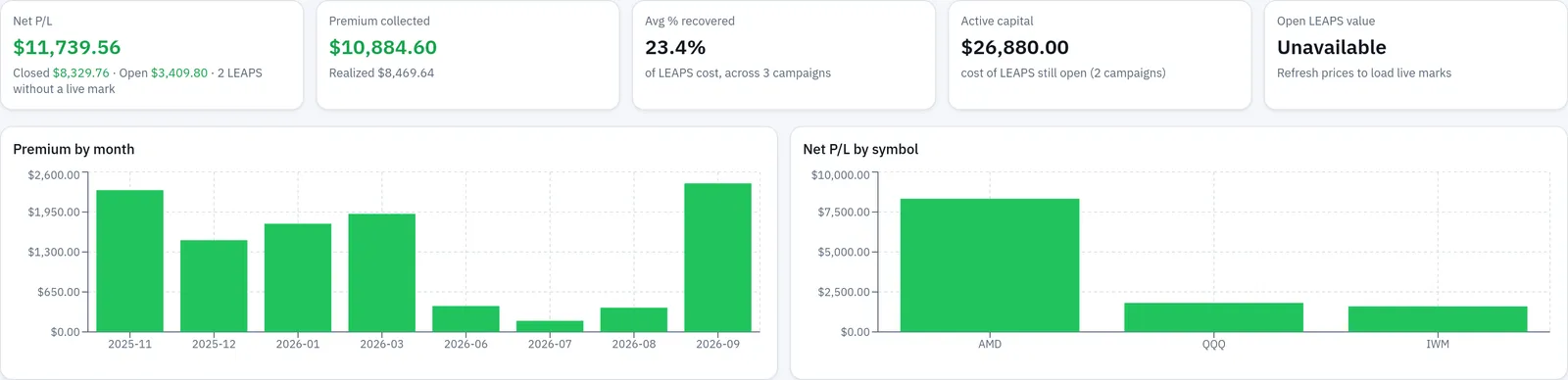
Each tile has a precise meaning. Net P/L combines closed and open campaigns, with the split shown underneath. Premium collected totals the short-call premium, with the realized part shown underneath. Avg % recovered averages the share of each campaign's long-call cost covered by short-call premium. Active capital totals the cost of long calls still open. Open LEAPS value totals those long calls at their live prices, and reads Unavailable — never $0 — when any of them has no live price.
Premium by month groups short-call premium by the month each call was sold, which is the chart version of the Premium to date column in your sheet. Net P/L by symbol shows up to ten symbols. Both charts, and all five tiles, respond to the current filters.
Filtering and sorting the campaign list
Under the tiles sit the filters and the list itself. Work through the filters before reading any row: the status buttons, the symbol picker, and the date range all change what the tiles above are totalling.
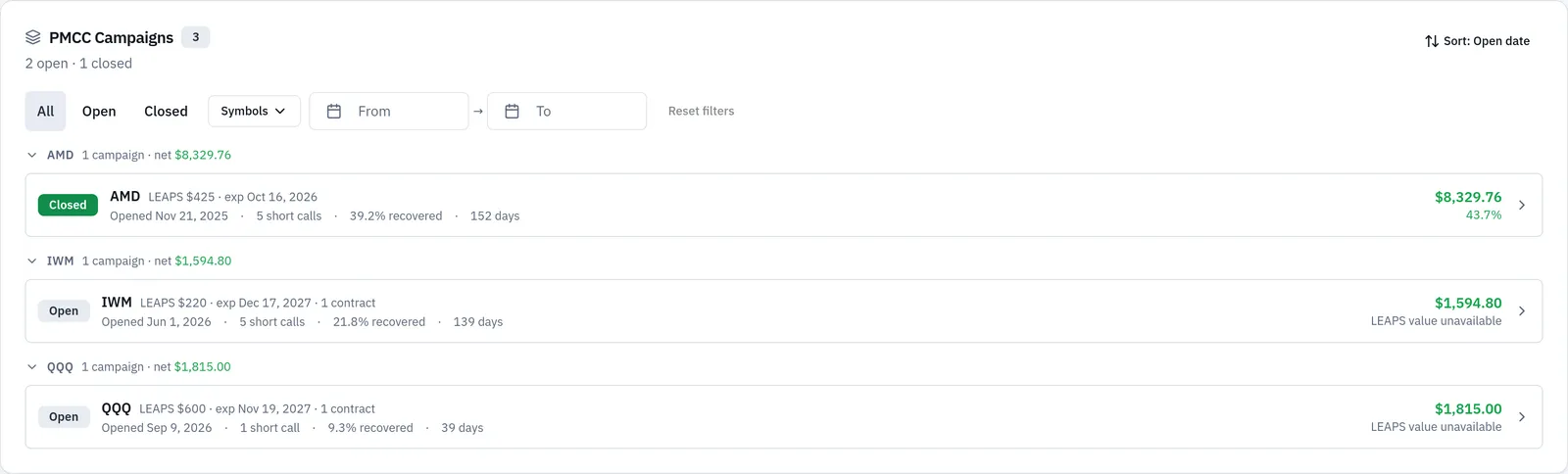
Choose All, Open or Closed. Use Symbols and Search symbol… to pick one or more underlyings. Use From and To for a date range — a campaign is included when it was running at any point inside the range, not only when it opened there. In All Accounts, choose an account or All accounts. Reset filters restores the full list, and if nothing matches, the page says No campaigns match the current filters. and offers the same reset.
Each campaign row shows Open or Closed; the symbol, long-call strike and expiration, and open contract count; the open date, number of short calls, % recovered and days held; net P/L and return on the long-call cost; and a warning count when the campaign has notable events. When an open campaign's long call has no live price, the row reads LEAPS value unavailable and its net P/L leaves the long call out.
Campaigns are grouped by symbol. In All Accounts the list is partitioned by account first, then by symbol, and each account's campaigns are detected separately — the per-account rule from the hand log, enforced for you. The Sort menu orders campaigns by Open date, Net P/L, % recovered, Return on cost or Days held.
Inside one campaign
Selecting a row opens PMCC Campaign — followed by the symbol. This is the screen that corresponds to a whole sheet in your workbook: a summary block on top, then the event-by-event history. Read the summary first, then check that the timeline's outcomes match what you remember doing.
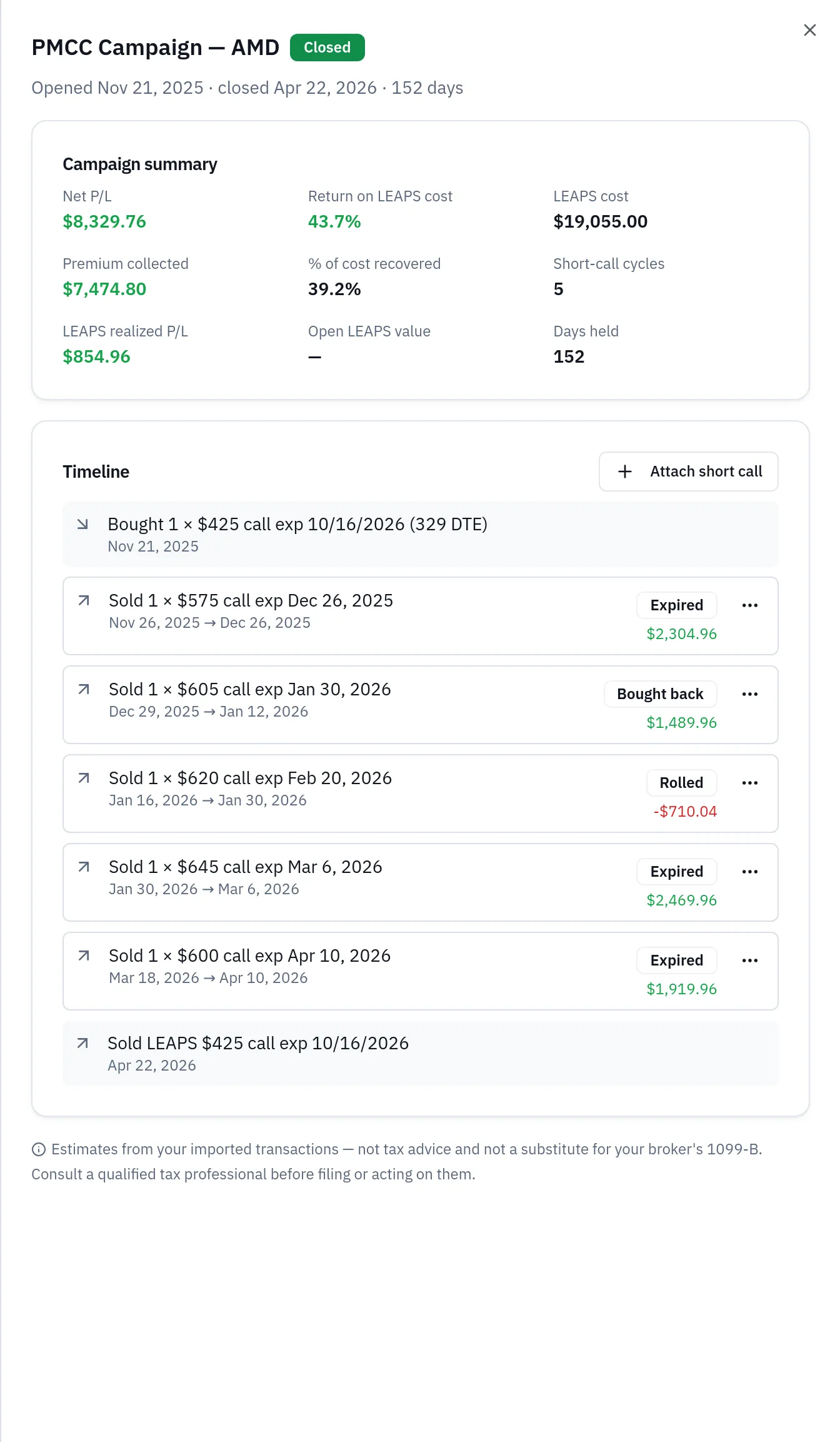
The Campaign summary shows Net P/L, Return on LEAPS cost, LEAPS cost, Premium collected, % of cost recovered, Short-call cycles, LEAPS realized P/L, Open LEAPS value and Days held. The Timeline lists, in date order: the long-call purchase; each short call sold, with its outcome — Open, Bought back, Expired, Assigned, Assigned early or Rolled; long-call rolls; and the long-call exit. Notable events are highlighted, such as a short call assigned early, or the long call sold while short calls were still open.
An open campaign looks slightly different, because one of its numbers depends on a price that may not have loaded. This is also where the per-call correction menu lives.
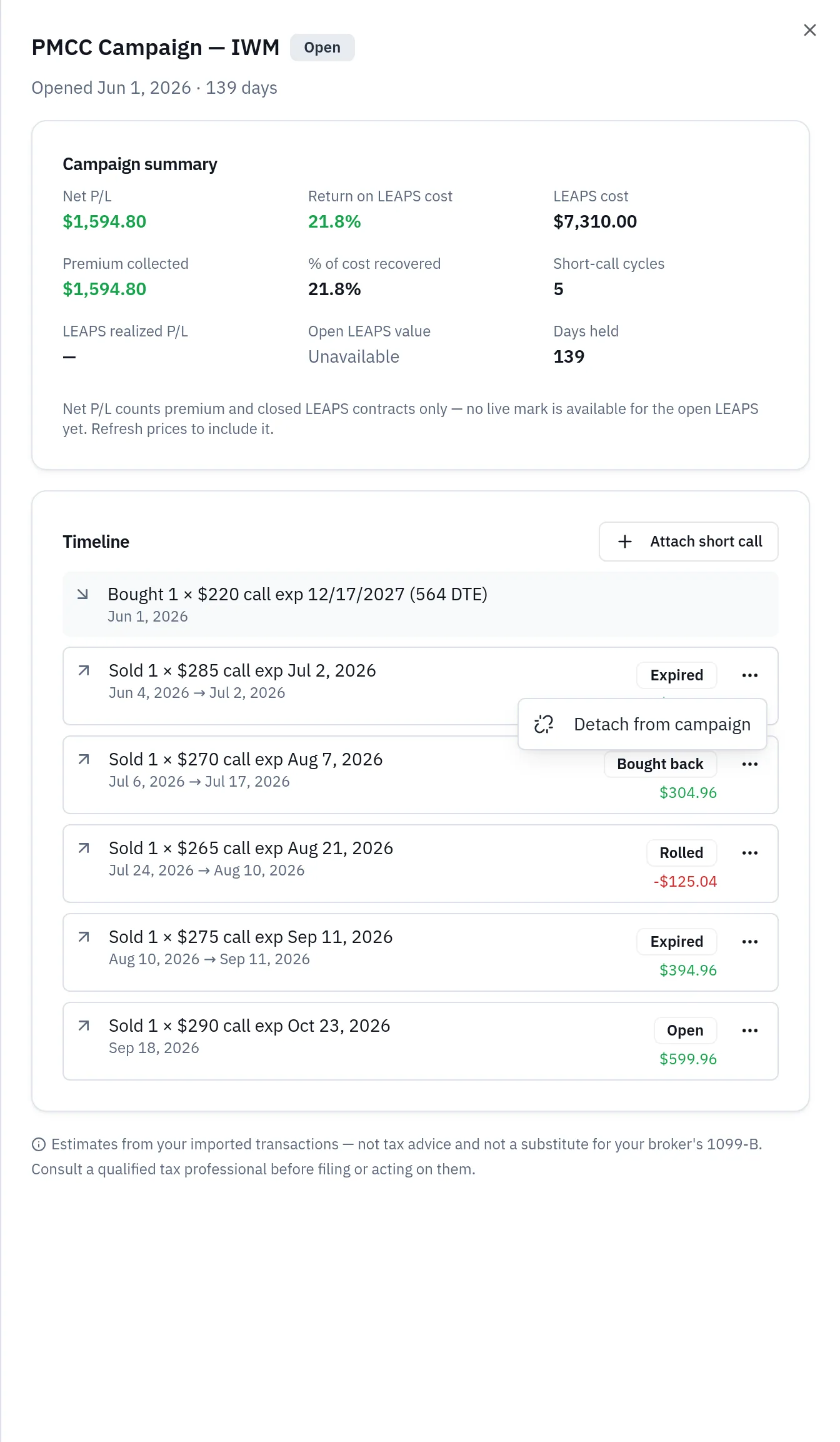
When no live price has loaded for the long contract, Open LEAPS value reads Unavailable and the campaign's net P/L counts only premium and closed long contracts. Refreshing prices is the fix. Each short call in the timeline has a Change campaign link menu, available to Pro users, offering Move to another LEAPS (pick another campaign on the same symbol in the same account), Detach from campaign (keep the call out of every PMCC campaign), and Return to automatic linking, which appears only on calls you changed.
Fixing campaign links
The automatic rules sometimes put a short call in the wrong place — a call that was really a standalone trade, or two long calls on the same symbol that each deserve their own short calls. Pro users correct this from the drill-down. The attach list is the first place to look when a call you expected is missing.
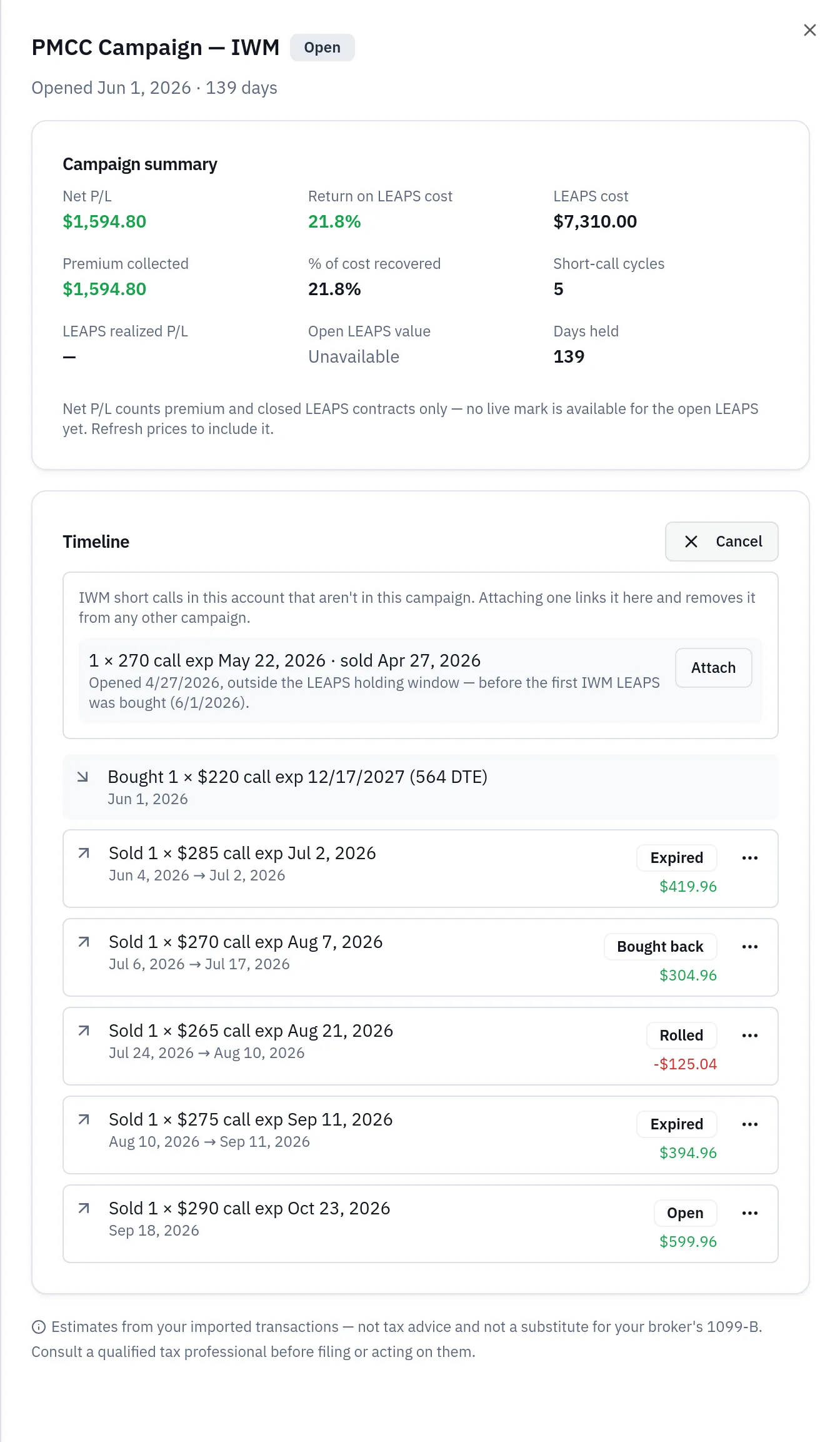
Attach short call lists the symbol's short calls in the same account that are not in this campaign, including ones linked to another campaign; selecting Attach links it here, and a call attached from another campaign is moved, not copied. A call you detached earlier shows Undo detach in the same list. Short calls you linked are marked Manual in the timeline.
The other direction matters just as much: calls the rules could not place at all. This list is the app's equivalent of the orphan rows at the bottom of a spreadsheet, except that each one carries its reason.

Short calls not linked to a campaign lists short calls that could not be attached on symbols where you bought a long-dated call in the same account. The reasons are Opened before the LEAPS, Opened after the LEAPS closed, Expires after the LEAPS, Exceeds LEAPS contract count and Detached by you. Newest first; the first 50 are shown, and Show all reveals the rest. Pro users can link one with Attach to LEAPS, which lists every long call on that symbol in the same account, including ones with no short calls yet — picking one links the call there and starts the campaign if needed. Undo detach appears on calls you detached and returns them to automatic linking; use it after detaching a campaign's only short call, when that campaign's drill-down no longer exists.
Detached calls appear in this list with the reason Detached by you. A manually attached call stays in its campaign even when it breaks the automatic rules, such as expiring after the long call — and it still uses the long call's contracts, so the automatic rules will attach fewer other calls to that long call. Calls linked to a wheel cycle, or grouped into a diagonal position, cannot be moved here.
Shorter-dated long calls
If your PMCCs are built on 90-to-150-day calls rather than true LEAPS, the 180-day rule will not start a campaign for them. Pro users can opt one in. Shorter-dated long calls lists long calls bought with 60 to 179 days to expiration that had at least one short call on the same symbol and account sold while you held them, expiring no later than the long call. Each row shows the days to expiration at purchase and how many such short calls there were; the first 50 are shown, newest first. Select Treat as LEAPS and the long call starts a campaign, with short calls attaching by the usual rules. Long calls with fewer than 60 days to expiration are not listed, because a long call that short is rarely the base of a PMCC. You can also do it through Attach to LEAPS, where shorter-dated long calls appear under Treat a shorter-dated long call as the LEAPS.
A campaign started this way shows a Manual badge in the campaign list and a Manual LEAPS badge in its drill-down; Stop treating as LEAPS undoes it and sends its short calls back to automatic linking. If no short call ends up attached, the long call stays in Shorter-dated long calls with a Manual badge and an Undo button. Rolling a long call you marked continues the same campaign.
All corrections are saved per account and kept through data refreshes, new uploads and broker syncs. If you change the same call more than once, the latest change wins. To clear every correction at once, use PMCC Corrections under Manual Adjustments in Trading Account Data; Reset All clears them too. Correcting campaign links is for Pro users only — anonymous visitors see the controls disabled, with a For Pro users only tooltip.
Campaigns from the positions tables
You do not have to start from the Analysis tab. When you are looking at a position and wondering whether it is part of something larger, the pill on the row tells you.
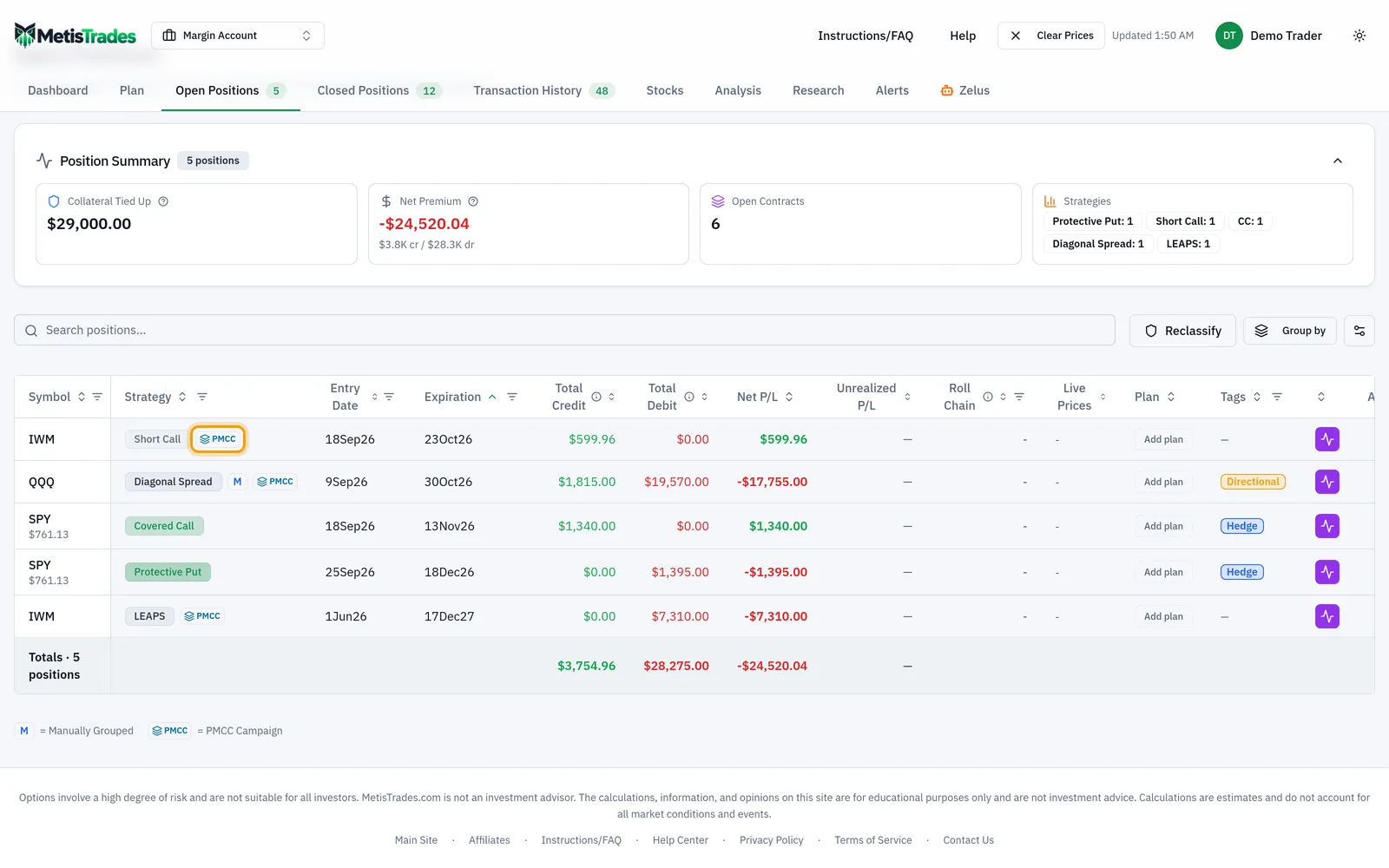
In Open and Closed Positions, the long call and every short call in a campaign show a small PMCC pill next to the strategy. Hover it to see whether the campaign is open, which side the row is, and how many short calls it has. Select the pill to open the same campaign drawer as the Analysis page. The strategy label itself does not change: short calls still read Short Call, and the long call still reads LEAPS or Long Call. Campaign tracking groups trades for reporting; it does not relabel them. Public share links do not include the PMCC Campaigns sub-tab, but shared positions tables still show the pills, and selecting one opens a read-only campaign drawer.
What this page is not
Finally, the page it is easy to confuse with this one. If you are deciding whether to open a PMCC rather than reviewing one you already own, you want the Research tool instead, which starts from a symbol lookup and never touches your trade history.
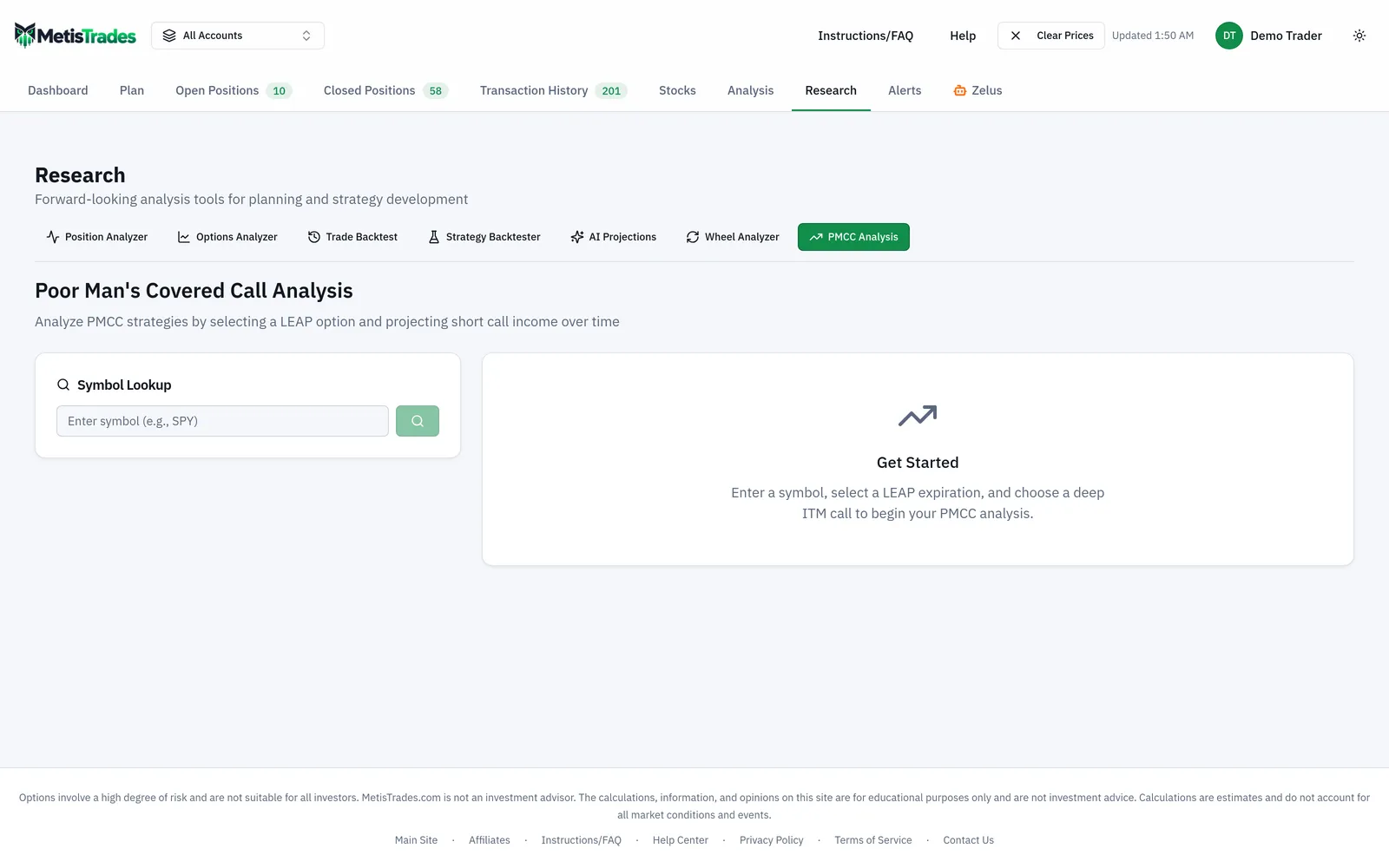
PMCC Analysis under Research projects hypothetical outcomes from live option chains: you pick a long-dated expiration with at least 180 DTE, pick a deep in-the-money call, set short-call assumptions, and read projected cycles under price scenarios. It is pro-flagged and it never looks at your own trades. PMCC Campaigns reports on trades you actually made. The two answer different questions and should never be read as confirming each other.
How to read the results
Every figure on this page is an estimate built from your imported transactions. Here is what each one means, and what it does not.
LEAPS cost is the debit paid for the long call, adjusted by the debits and credits of any long-call rolls. In the worked example that is $1,500, and it would stay the campaign's cost base even if you later rolled the January 2027 40 call out — the roll would adjust it rather than start a second campaign. It is not the capital you have at risk today, and it is not what the contract is worth now.
Premium collected is short-call premium: the realized result once a short call closes, and its opening credit while it is still open. That mixed basis matters. The $300 in the worked example is a settled figure because every short call there had finished; a campaign with a short call still open is carrying that call's opening credit in the total, and the credit can turn into a smaller number, or a loss, when the call is finally closed. The tile on the summary row shows the realized part underneath for exactly this reason.
% of cost recovered is Premium collected divided by LEAPS cost, times 100 — the 20% in the worked example. It says how much of the long call's price the short side has handed back. It does not say the campaign is 20% of the way to profit: the long call can be worth far more or far less than you paid, and that is a separate number. Nor is it a rate: 20% over five months and 20% over eighteen months are very different outcomes, which is what Days held is for.
Short-call cycles is simply how many short calls the campaign contains. High cycle counts are not automatically good; they can mean steady income or they can mean repeated defensive rolls.
LEAPS realized P/L is the result on long contracts that have closed, including contracts closed by a roll. In the worked example the long call's own contribution was $220. If you closed only part of a multi-contract long position, this is the part that has closed — the rest is still open.
Net P/L is Premium collected plus LEAPS realized P/L, plus the open long call's live value minus its cost when a live price exists. For a closed campaign the open-value term drops out. For an open one, remember that it leans on a quote: quotes in MetisTrades are delayed, and when no price has loaded, Open LEAPS value reads Unavailable, the row reads LEAPS value unavailable, and the long call is simply left out of the campaign's net P/L. A campaign showing only its premium is not a campaign that lost its long call; it is one waiting for a price.
Return on LEAPS cost is Net P/L divided by LEAPS cost, times 100. It is a return on the long call's debit, not on margin, buying power, or the account. It is also not annualized — pair it with Days held before comparing two campaigns.
Days held counts calendar days from the long-call purchase to its exit, or to today while the campaign is open.
Two more reading habits are worth building. First, treat the warning count on a row and the highlighted events in the timeline as prompts to check your own memory of the trade: a short call assigned early, or the long call sold while short calls were still open, changes how the rest of the numbers should be read. Second, when a figure looks wrong, look at Short calls not linked to a campaign before you doubt the arithmetic. A low % recovered usually means a short call is sitting in that list with a reason attached, not that the calculation is off.
And the structural limits: detection depends on complete imported option activity for both sides of the trade, and short calls are matched against the long contracts held on the day they were sold, so missing fills change which calls attach. Legs in different accounts are never joined, even for the same symbol. Date-only imports cannot show the order of same-day fills, so a short call sold the same day the long call was bought is treated as sold while it was held. Put-side diagonals are not tracked. Corrections only change which campaign a short call belongs to, or which long calls count as a LEAPS; they do not change strategy labels or roll chains, and a correction pointing at a campaign that no longer exists is ignored, with the call linked automatically again. All results are estimates from your imported transactions and are not tax advice.
Common mistakes
- Logging a roll as two unconnected rows. The closing debit gets dropped and premium collected is overstated. Fix: one row per roll, carrying its net credit or debit — in the worked example the 10 April roll is a single −20 line that pulls recovery back to exactly 20%.
- Adding only credits to premium collected. Buy-backs and debit rolls are part of the short side's result, and ignoring them makes % recovered look better than it is. Fix: run premium as a net figure that is allowed to fall, as the 10 March buy-back does from 230 to 190.
- Starting a new campaign when you roll the long call. You lose the earlier premium from the recovery base and report two half-campaigns. Fix: keep the same campaign and let the roll's debit or credit adjust the LEAPS cost, which is what MetisTrades does automatically.
- Counting a call written against shares as part of the campaign. Share-backed calls belong with covered calls and wheel cycles and are never claimed by a PMCC campaign. Fix: leave them out of the log, and do not try to attach them in the app.
- Reading % recovered as progress toward profit. It measures the short side only; the long call's gain or loss is a separate figure. Fix: read % recovered alongside LEAPS realized P/L and Net P/L — $300 of premium and $220 on the long call tell two different stories.
- Treating Unavailable as zero. An open campaign with no loaded price for its long call shows Open LEAPS value: Unavailable, and its net P/L counts only premium and closed long contracts. Fix: refresh prices before comparing open campaigns against each other.
- Assuming a missing short call is a bug. Calls are left out for named reasons — opened before the LEAPS, opened after it closed, expiring after it, exceeding the long contract count, or detached by you. Fix: open Short calls not linked to a campaign, read the reason, and use Attach to LEAPS or Undo detach if the rule got it wrong.
Related guides and help pages
Related guides
- Plan, Track, Optimize: a complete tour of MetisTrades
- The poor man's covered call, and how to evaluate one
- PMCC Short Call Went ITM: Roll, Close Both, or Exercise the LEAPS?
- Tracking the Wheel Strategy: Premium, Share Basis and the Cycle Result
- Understanding Roll Chains: Tracking a Rolled Option as One Trade
- Tracking covered-call income by symbol