Tags and notes: adding your own context to positions
Tags are short private labels on positions; notes are dated entries on a position or a single transaction. This guide shows how to apply them consistently and how to read what Tag Analysis reports back.
What it does and when to use it
A brokerage file records what you did. It does not record why. Six months later the ledger still shows that you sold a put on XYZ at the $45 strike for $1.10, but it has forgotten that you sold it because implied volatility was elevated and you wanted the shares anyway.
Tags and notes are the two ways MetisTrades lets you add that missing context without altering the imported transaction.
- A tag is a named, colored label attached to a position. Tags are reusable, and one position can carry several.
- A position note is dated free-form text attached to a position.
- A trade note is dated free-form text attached to one transaction row.
Use a tag when the context is short, repeatable and something you will later want to count: a setup, an entry rule, a source of the idea, an account purpose. Use a note when the context is a sentence or a paragraph that only applies to this one position or one fill.
The payoff comes later. Because tags are reusable labels, the Tag Analysis page can group your closed and open positions by tag and compare them: Total P/L, Win Rate, Wins, Losses and position counts, tag by tag. That turns "I think my earnings trades go badly" into a number you can look at. Notes do the opposite job — they are not aggregated, they are there so that the reasoning behind a single decision survives.
Two terms used below: realized P/L is profit or loss from activity that has closed or settled, estimated from your imported transactions; unrealized P/L is the estimated gain or loss on positions still open, valued with the latest available delayed quotes.
You must be signed in and have Pro access to reach the portfolio pages where tags and notes are managed. Anonymous visitors who have uploaded a file can read Transaction History for that browser session but cannot annotate rows. Tags and notes are private account data: a public share link does not expose the Notes column, Position Notes, Trade Notes, the Tags column or Tag Analysis.
A worked scenario
You sell cash-secured puts and covered calls on a handful of tickers. You suspect two things about your own behaviour: that your best entries come when implied volatility is already high, and that holding a short put through an earnings report is where your losses come from. Neither suspicion is testable from a broker file, because the broker never recorded why you opened anything.
So you adopt exactly two tags and apply them at entry, for one quarter:
high-iv-entry— applied when you open because IV rank was elevated.earnings-week— applied when the position's expiration falls after a scheduled earnings date.
One position gets both. On 14 October you sell 2 XYZ Nov 21 $45 puts for $1.60 per contract. That is a credit of 2 × 100 × $1.60 = $320. IV rank was high, and earnings land on 4 November, so you tag it high-iv-entry and earnings-week, and you write a position note: "IV rank 68, selling into earnings deliberately, happy to own 200 shares at 45. Plan: close at 50% or take assignment."
XYZ reports badly. On 8 November you buy the puts back for $7.23 per contract: 2 × 100 × $7.23 = $1,446 paid out. Realized P/L is $320 − $1,446 = −$1,126 before fees. You add a second note, dated that day: "Closed for a loss. Earnings gap, not an IV problem. Rule was wrong, not the entry."
By quarter end, Tag Analysis compares the two tags like this:
| Tag | Total P/L | Win Rate | Wins | Losses | Open | Closed | Total |
|---|---|---|---|---|---|---|---|
| high-iv-entry | +$1,240 | 75% | 6 | 2 | 1 | 8 | 9 |
| earnings-week | −$310 | 60% | 3 | 2 | 0 | 5 | 5 |
The earnings-week row is the one to read closely. Three wins of $186, $174 and $212 add to $572. Two losses of −$76 and the XYZ trade's −$1,126 add to −$1,202. $572 − $1,202 = −$630 — and that is before you notice this tag only has five closed positions behind it.
Step by step in MetisTrades
1. Create and apply the tag
- Open the position to show its details.
- In the header, choose Tag when no tag is attached yet, or use the add control beside the existing tags.
- In Manage Tags, type the new tag name and create it. A newly created tag is automatically added to the open position.
- For later positions, use the same Manage Tags list to toggle the existing tag on. Do not retype it — that is how you end up with
high-iv-entryandhigh IV entryas two separate tags.
Removing a tag from one position does not remove it from any other position.
2. Write the position note at entry
- Open Open Positions or Closed Positions.
- Use the notes control on the position row. The Position Notes panel opens with a description of the selected position.
- Type your note and choose Add Note.
Before the first note, the panel reads No notes yet and Add your first note below. Each saved note shows its date and time, and a note you later change is marked (edited). You can add as many notes to one position as you like, which is what makes the entry note and the exit note on the XYZ put sit together as a short journal. Editing offers Save or Cancel; deleting is permanent once you confirm Delete in the Delete Note dialog.
3. Note a single fill in Transaction History
Some context belongs to one row, not the whole position — a bad fill, a partial, a correction. Open Transaction History, find the Notes column, choose the notes control on that row, type under Add a note about this trade... and choose Add Note. The row control then shows a count; counts above nine display as 9+. Editing and deleting work as they do for position notes.
4. Filter and group by tag
On the open and closed position tables, the Tags column can be filtered through its column filter, and the general filter area can show a Tags control headed Filter by Tags. Choose one or more names to narrow the rows, and Clear All Filters to reset. You can also group rows by Tag: a position with several tags appears in each applicable group, and positions with no tag appear under Untagged.
The screenshot below is Open Positions with the Tags column visible. Look at how the labels sit on each row, and at how quickly you can see which rows have no tag at all.
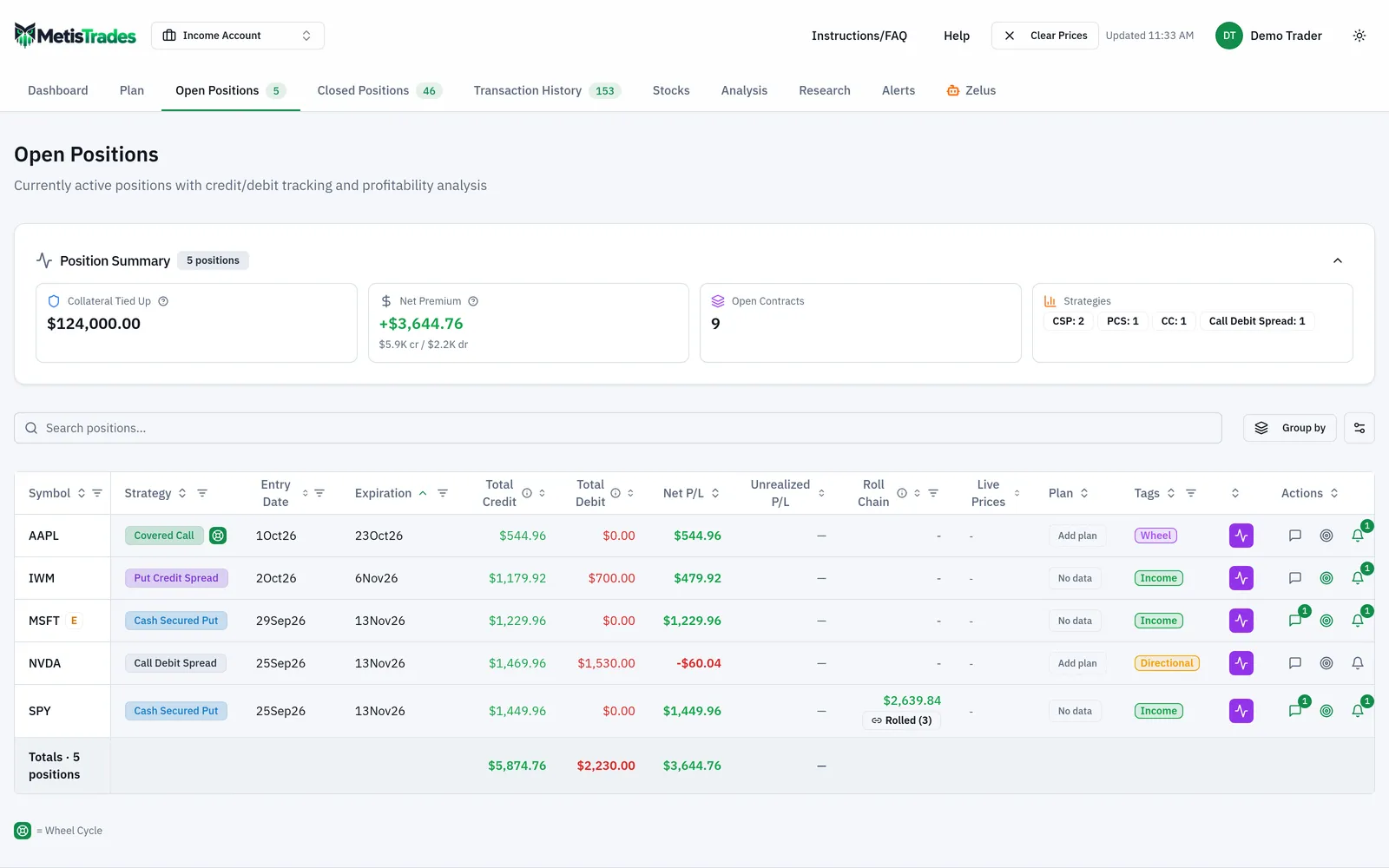
In All Accounts mode, tags with the same name are presented together by name in the tag filter, although the saved tag records stay scoped to their trading accounts.
5. Compare the tags
Open Analysis, then Tag Analysis. Under Select Tags to Analyze, choose high-iv-entry and earnings-week; leaving the selection empty includes all tags. You can narrow further with All Symbols.
How to read the results
Tag Analysis reports four summary figures — Total P/L with its realized and unrealized amounts, Win Rate with wins and losses, Positions split into open and closed, and Tags Analyzed — then a Tag Performance Comparison table and a Strategy Distribution by Tag breakdown. When tags are selected, a Positions with Selected Tags section also appears, showing up to 20 matching positions.
The comparison table is the part that answers the question you started with. Look at the row per tag and at how the Wins and Losses counts sit beside the P/L.
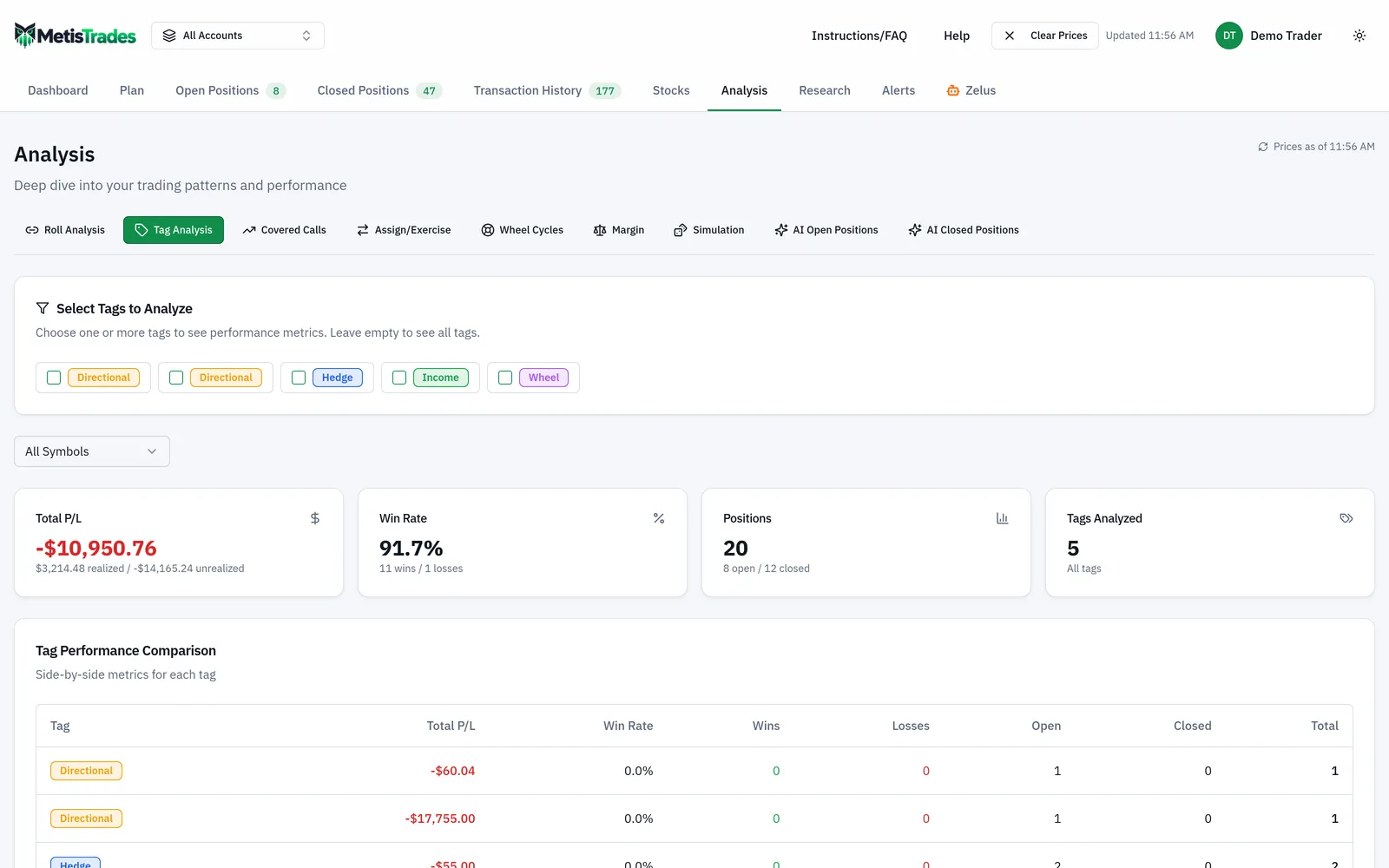
For the scenario, here is what each number means and what it does not.
- high-iv-entry, Total P/L +$1,240. That is the estimated P/L of the nine positions carrying the tag — eight closed and one still open. Because one is open, part of the $1,240 is unrealized and will move with delayed quotes. It is not $1,240 banked.
- high-iv-entry, Win Rate 75%. Six wins out of the eight closed tagged positions. The open position is not in the ratio. A 75% win rate sits comfortably alongside a large loser, so read it next to Total P/L rather than instead of it.
- earnings-week, Total P/L −$310 with Win Rate 60%. This is the shape worth noticing: more winners than losers, and still negative overall, because −$1,126 on the XYZ put swamped three wins totalling $572. The win rate and the P/L are telling you different things, and here they disagree.
- Do not add the rows. The XYZ put carries both tags, so it is inside both rows. $1,240 + (−$310) = $930 counts its −$1,126 twice. Remove the duplicate once and the two tags together cover $930 + $1,126 = $2,056 across 13 distinct positions, not the 14 you get by adding the Total column.
- Five closed positions is a sample, not a finding. The
earnings-weekrow describes what those five trades did. It does not establish a pattern, and it says nothing about what a sixth would do.
What the tags give you that the ledger could not: the −$1,126 is now attached to a decision rule you can name. The note you wrote on 8 November — that it was an earnings gap, not an IV problem — is attached to the position itself, in Position Notes, where it stays. If you roll a position, notes remain attached to the positions where you wrote them, and Roll Chain History can surface notes from earlier positions in the chain.
Limits and assumptions
- Tags apply to positions, not to transaction rows. If the context belongs to one fill, use a trade note in Transaction History instead.
- Multi-tag positions are counted in each tag's results. Tag Analysis does not deduplicate across the rows of its comparison table, so the rows are not additive and their sum is not a portfolio total.
- The selected-positions section displays up to 20 matching positions. If a tag covers more than that, the section is a sample of it, not the whole set.
- Every P/L, win-rate and performance figure here is an estimate derived from imported transactions. Missing opening trades, transfers, assignments or fees change the numbers underneath the tag.
- Quotes are delayed. The unrealized portion of a tag's Total P/L can change once prices are fetched, so a tag containing open positions is a moving figure.
- Win Rate counts only the closed tagged positions the analysis counts. It is a ratio of trades, not of dollars, and it ignores size entirely.
- Tags and notes are private account data. They are left out of a public share, and the transaction notes field is removed from shared data. The one exception: if you explicitly request an AI trade review, position notes may be included in what is sent to the AI provider. Never store passwords, brokerage credentials or account numbers in a note.
- A tag only measures what you were disciplined enough to apply. If you tagged six of your ten high-IV entries, the comparison describes those six.
Common mistakes
- Tagging the outcome instead of the reason. A tag called
winnertells you nothing you did not already see in the P/L column. Fix: tag the decision or setup you want to test, and let Total P/L and Win Rate report the outcome. - Inventing a new spelling each time.
high-iv-entry,High IVandhighIVare three tags with three separate comparison rows. Fix: apply tags by toggling the existing name in Manage Tags rather than typing a new one. - Adding the Total P/L column together. Any position with two tags is inside two rows. Fix: treat each row as a self-contained view, and subtract shared positions once if you need a combined figure.
- Running twenty tags. Spread thinly, no tag accumulates enough closed positions to say anything. Fix: keep three to five tags that answer a question you actually have, and retire the rest.
- Writing the note after you close. A reconstructed reason is the reason you wish you had. Fix: write the entry note the day you open, while the thesis and the plan are still accurate.
- Expecting a share viewer to see your context. The Notes column, both note panels, the Tags column and Tag Analysis are all unavailable in public-share mode. Fix: write anything a viewer needs to read somewhere outside the app.
- Putting sensitive details in a note. Fix: keep account numbers and credentials out entirely — notes attached to a position may be sent to the AI provider when you request an AI trade review.
Related guides and help pages
Related guides
- Keeping a Clean Transaction Ledger: Your Portfolio's Source of Truth
- Comparing Results by Tag: Which of Your Setups Actually Pays
- Tracking the Wheel Strategy: Premium, Share Basis and the Cycle Result
- Understanding Roll Chains: Tracking a Rolled Option as One Trade
- Tracking covered-call income by symbol
- Tracking assignments and exercises: shares, basis and what happened next