Tracking assignments and exercises: shares, basis and what happened next
An assignment turns an option position into a stock position, and your record keeping has to follow it. Learn to log each assignment by hand with a worked three-row example, then see how MetisTrades links premium, share basis and later sales.
What it is and why it matters
An assignment is what happens when the person on the other side of your short option uses their right under the contract and you have to fulfil it. If you sold a put (the right to sell shares to you at a fixed price), assignment means you buy the shares at the strike, the fixed price written into the contract. If you sold a call (the right to buy shares from you at a fixed price), assignment means your shares are sold at the strike.
Exercise is the same event seen from the other side: the holder of an option chooses to use it. Exercise is the holder's action; assignment is the obligation that lands on the seller.
Either way, something important happens to your records. Up to that moment you were tracking an option: a credit received, a strike, an expiration date. After it, you are tracking shares: a quantity, an acquisition date and a cost basis that will follow those shares until you sell them. One event closes a line in the options ledger and opens a line in the stock ledger, and the two halves have to stay connected if you want to know whether the whole thing worked.
That connection is where most record keeping falls apart. The premium you collected for the put is not part of your tax cost basis for the shares, but it is absolutely part of what the shares really cost you. Traders handle this by keeping two numbers: the strike, which is the acquisition price, and a premium-adjusted price, which is a tracking figure that tells you the effective price after the option income. Keep them in separate columns and never confuse the second for the first.
One more mechanical point before the numbers. One option contract represents a number of underlying units set by its contract size, usually 100 shares for standard equity options, but 10 for mini options and a broker-supplied multiplier for futures options. The share count that arrives at assignment is contracts multiplied by that multiplier, not automatically contracts times 100.
How to track it by hand
The log below is the whole method: one row per assignment or exercise, in date order, with the share effect and cash effect computed from the strike. The worked example follows a single stock, XYZ, through a put assignment that delivered shares and two call assignments that took them away again.
Columns marked with an asterisk are calculated, not typed. You enter the date, the symbol, whether the assigned option was a put or a call, the number of contracts, the strike and the premium per share you originally collected for that option.
| Date | Symbol | Option | Contracts | Strike | Premium / share | Shares +/−* | Stock cash* | Premium-adjusted price* | Shares held after* |
|---|---|---|---|---|---|---|---|---|---|
| 2026-01-16 | XYZ | Put | 2 | 50 | 1.5 | 200 | -10000 | 48.5 | 200 |
| 2026-02-20 | XYZ | Call | 1 | 54 | 1 | -100 | 5400 | 55 | 100 |
| 2026-03-20 | XYZ | Call | 1 | 52 | 1.2 | -100 | 5200 | 53.2 | 0 |
| Totals | 0 | 600 |
Row 1: the put assignment
Two short puts at the 50 strike were assigned on 2026-01-16. A put assignment buys shares, so the share column is positive: 2 contracts × 100 = 200 shares. The cash column is the mirror image of the shares at the strike: 200 × 50 = 10,000 leaves the account, shown as -10,000. The premium-adjusted price for a put is strike minus premium: 50 − 1.50 = 48.50. That is what the shares effectively cost you once the 1.50 per share you collected for the put is taken into account. Your acquisition price for basis purposes is still 50. Shares held after the row is the running total for that symbol: 200.
Row 2: the first call assignment
One short call at the 54 strike was assigned on 2026-02-20. A call assignment sells shares, so the share column is negative: 1 × 100 = -100 shares. Cash moves the other way: 100 × 54 = +5,400. The premium-adjusted price for a call is strike plus premium: 54 + 1.00 = 55.00, the effective sale price per share. The running share count drops from 200 to 100.
Row 3: the second call assignment
The remaining 100 shares were called away at 52 on 2026-03-20, bringing in 5,200 and leaving the premium-adjusted sale price at 52 + 1.20 = 53.20. Shares held after falls to 0, which is the signal that this round trip is finished and can be assessed as a whole.
Reading the totals
Net shares is 0, confirming every share that arrived has gone. Net stock cash is 600: −10,000 + 5,400 + 5,200. That 600 is the stock side only — 200 shares acquired at 50 and sold at an average of 53, a gain of 3 per share.
The option side sits beside it. Adding the premium columns by hand: 200 × 1.50 = 300, plus 100 × 1.00 = 100, plus 100 × 1.20 = 120, which is 520 of premium collected across the three assigned options. Stock result plus option premium gives a combined 1,120 for the sequence. Keeping those two figures separate matters, because a positive combined result can hide a losing stock leg paid for by premium, or the reverse.
The spreadsheet below contains these three rows and the formulas that produce every calculated column, including the running share count per symbol.
Download the template: Assignment and exercise log (.xlsx). It opens in Excel, and in Google Sheets via File → Import. The worked example from this guide is already filled in, and the formulas carry down into the blank rows.
If you only ever do this by hand, the discipline is simple: write the row on the day the broker reports the event, enter the strike rather than the market price, and never overwrite the strike with the premium-adjusted price.
Where manual tracking breaks down
The three-row example is tidy because it is one symbol, one account and three whole-contract events. Real broker history is not.
- The event arrives as two records, not one. Brokers typically report the option lifecycle record (the leg closing by assignment or exercise) separately from the stock trade that carried the shares, sometimes dated a day apart. Log one and miss the other and your share count and your option ledger stop agreeing.
- Partial assignment. You are short three calls and one is assigned. The option position is still open for two contracts while 100 shares have already gone. A single-row-per-position log cannot express that.
- Unknown basis on some of the shares. If part of a holding came in by transfer or predates your records, you know what the shares sold for but not what all of them cost. The honest treatment is to calculate the stock result only for shares whose basis you know, and to label the rest, rather than quietly treating unknown basis as zero and inventing a profit.
- Rolls before the assignment. If the assigned option was the last link in a roll chain — a sequence of positions created by closing a leg and opening a replacement — the premium attached to that final position is not what the whole campaign earned. Prior rolls may have been taken at a cost. Judging the assignment on the last credit alone flatters it.
- What happened to the shares afterwards. A put assignment is not finished when the shares arrive. They might be sold in pieces, over months, at several prices. Tying those later sales back to the assignment that created the position is tedious by hand and easy to abandon.
- Multiple accounts. The same ticker assigned in two accounts has two separate share pools and two separate running counts. A single sheet with one running total per symbol will be wrong in both.
- Corrections. Brokers restate. A re-reported assignment or a corrected share quantity means going back and editing a row you wrote weeks ago, and every downstream running total with it.
How MetisTrades does it
MetisTrades builds the same log from your imported broker history. It uses assignment and exercise lifecycle records in that history and attaches each one to the option leg it closed, then connects the option premium with the estimated stock result, later share sales and prior roll-chain results where those records exist.
Opening the page
Go to Top nav → Analysis → Assign/Exercise. If no events are detected in the imported history, the page shows No Assignments or Exercises Found.
Filtering to the events you want
Under Assignment Details by Symbol the type filter offers All, Assigned and Exercised, and the side filter offers All, Calls and Puts. The side filter is disabled while Exercised is selected. You can also select one or more symbols, and Clear resets every filter. A summary line reports the displayed and total event counts along with the active symbol, type and side filters. The filters drive everything on the page: the summary cards, the roll-impact card, the monthly chart, the symbol table and the expanded histories.
The summary cards
Total Assignments shows call and put assignment counts. Net Stock P/L shows stock P/L when no later dispositions exist, and becomes Stock + Disposition P/L once there are later share sales to include. Combined P/L combines option premium and stock P/L, and becomes True Combined P/L when dispositions exist. Success Rate is the percentage of filtered events with a positive combined result, and it also reports whether any events have partial cost basis.
The roll switch
When at least one event belongs to a roll chain, the page shows Include roll costs in P/L, on by default. With it on, the full roll-chain P/L is substituted for the final position's premium in the combined result. The Roll Chain Impact on Assignments card compares Position Premium Only with Roll Chain Total P/L and shows the difference as Roll Cost, plus how many filtered assignments belong to roll chains. (w/ rolls) appears on the Combined P/L card when roll costs are included.
The symbol table and event history
The table that replaces the hand-written sheet is organised by symbol first, with per-event detail one click away. Look at the right-hand columns to see how the option result and the stock result are kept apart before they are combined.
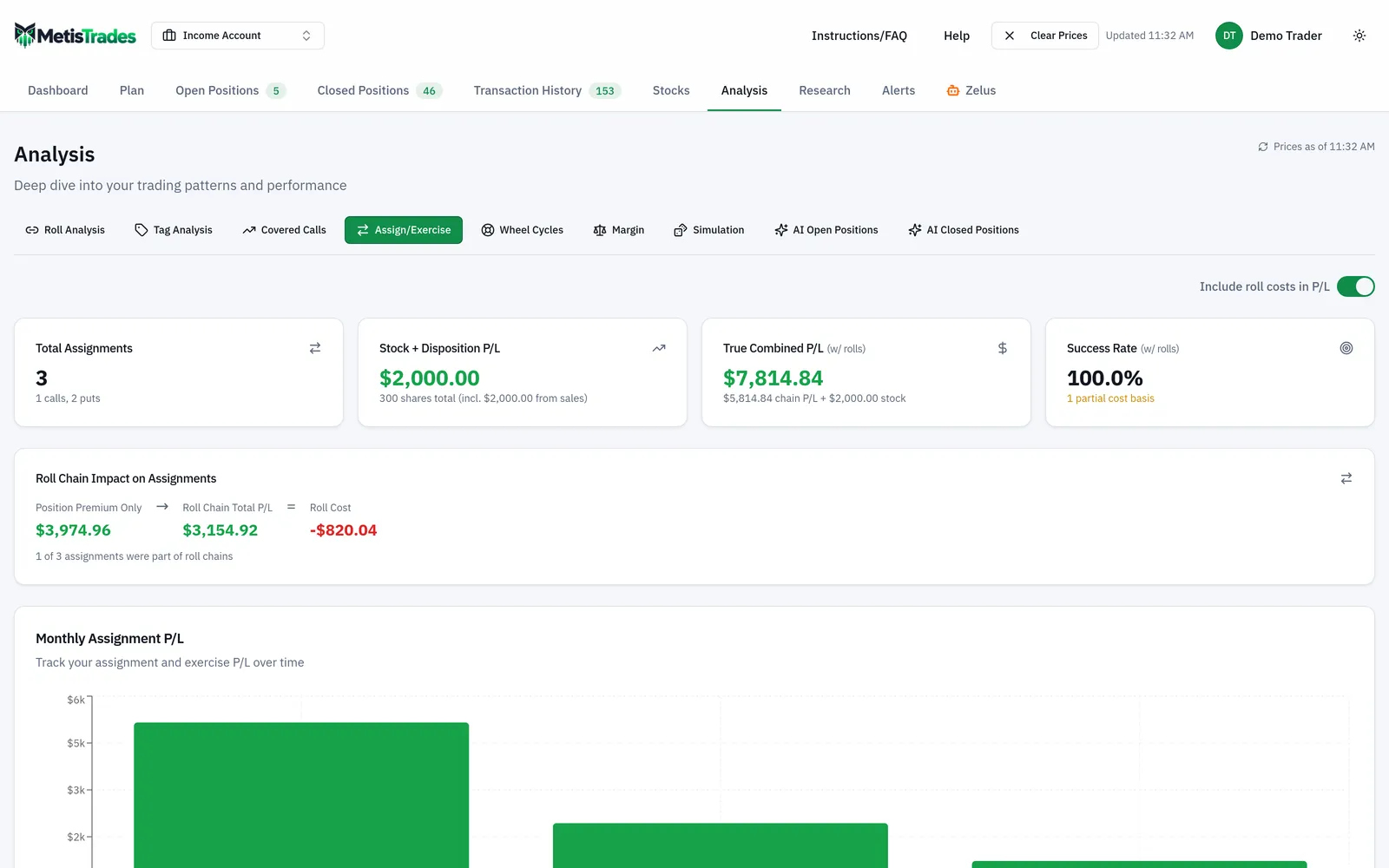
The main table columns are Symbol, Assignments, Avg Strike, Avg Cost Basis, Avg Gain/Share, Premium, Stock P/L, and either Combined P/L or True Combined. Roll Chain P/L appears when chain data exists, and Disposition P/L appears when later share dispositions exist. Expanding a symbol opens Assignment History for that symbol, with columns including Type, Strike, Cost Basis, Shares, Date, Premium, Stock P/L and the combined result, plus Roll Chain P/L and Disposition where applicable. Type badges read Exercised, Call Assigned and Put Assigned, and a Partial badge marks an event where cost basis exists for only some of the shares. Tooltips break out strike, cost basis, per-share difference, share count, roll-chain history, sales and full-lifecycle P/L. Selecting an event row opens the related position details.
When events span more than one month, Monthly Assignment P/L charts assignment and exercise P/L by month, with the combined value following the Include roll costs in P/L setting. In an all-accounts view, results are grouped by account with event, premium, roll, stock, disposition and combined subtotals, which answers the two-accounts-one-ticker problem directly.
Back to the source records
Detection depends on the imported option lifecycle and stock transaction history being complete, so when an event looks wrong the imported records are what you check.
How to read the results
Shares is option contracts multiplied by that contract's multiplier, which is why a mini-option assignment does not deliver 100 shares per contract. Price per share is the option strike, used as the acquisition or sale price for the shares — the same choice the hand-written log makes.
Cost basis works differently on the two sides. For a put-side event, the strike is recorded as the basis of the acquired shares and the option premium is tracked separately, so the immediate stock P/L is zero: nothing has been sold yet. For a call-side event, the basis is the estimated FIFO basis of the shares available at the event date, and Stock P/L is strike minus FIFO cost per share, multiplied by the shares with known basis. FIFO means first in, first out: the earliest shares acquired are treated as the first ones sold.
That last clause is the reason for the Partial badge. If the imported history supplied basis for some but not all of the shares, the unknown shares are excluded from the stock P/L figure rather than counted. Where no share basis is available at all, stock P/L is set to zero instead of treating unknown basis as profit. So a small Stock P/L next to a Partial badge is not a small gain; it is a gain measured on fewer shares than were actually sold.
Disposition P/L is the estimated realised P/L from later sales of shares acquired through a put assignment or a call exercise. It is what turns the first row of the worked example from an open question into a finished story. True Combined P/L is option premium, plus stock P/L at the event, plus later disposition P/L; when roll costs are included, the full chain P/L replaces the immediate position premium.
Avg Gain/Share, for call events with known basis, is the average of strike minus cost basis. It tells you how much room there was between what the shares cost and the strike they went out at. It says nothing about the premium, which is why it should be read next to the Premium column, not instead of it.
Success Rate is filtered events with a positive effective combined result divided by all filtered events. Like any win rate, it counts outcomes rather than sizing them: three small wins and one large loss still produce a 75% success rate. Read it alongside the combined total.
Two limits are worth holding on to. Every figure here — FIFO share basis, stock matching, dispositions, roll links and all P/L — is an estimate built from your imported transactions, and detection depends on that history being complete. And these figures do not account for delayed quote movement, because the page is about imported assignment, exercise and share-disposition records rather than current market value. Tax-related figures on the page are estimates from your imported transactions, not tax advice, and not a substitute for your broker's 1099-B.
Common mistakes
- Logging the share purchase at the market price instead of the strike. An assignment transacts at the strike no matter where the stock was trading. Fix: enter the strike in the price column, every time.
- Folding the premium into cost basis. It makes the shares look cheaper than any tax record will agree they are. Fix: keep the strike as basis and put the effective price in a separate premium-adjusted column, as the worked example does with 48.50 against a 50 strike.
- Assuming 100 shares per contract. Mini options and futures options use different multipliers. Fix: multiply contracts by the contract's own multiplier when you compute the share count.
- Judging an assignment on the last credit alone. If the position was rolled, the final premium ignores what earlier rolls cost. Fix: leave Include roll costs in P/L on and read the Roll Cost figure on the Roll Chain Impact card.
- Treating a Partial event as a complete result. Fix: when you see the Partial badge, go back and supply the missing opening history rather than reading the stock P/L as final.
- Closing the book when the shares arrive. A put assignment is half an outcome until the shares are sold. Fix: track the running share count to zero, then read True Combined P/L, which includes the later disposition.
- Pooling two accounts under one running share total. Fix: keep a share count per account per symbol by hand, or use the all-accounts view where results are grouped by account with subtotals.
Related guides and help pages
Related guides
- Tracking the Wheel Strategy: Premium, Share Basis and the Cycle Result
- Assignment and Exercise Explained: Shares, Cash and Basis
- What Happens at Expiration: Worthless, Assigned, Exercised or Closed
- Plan, Track, Optimize: a complete tour of MetisTrades
- Assigned at $100 with the stock at $85: where do you sell the first call?
- PMCC Short Call Went ITM: Roll, Close Both, or Exercise the LEAPS?