How Zelus Credits Work: Allowance, Top-Ups and What a Reply Costs
Set up and read your Zelus credit balance: where the meter lives, how the monthly allowance and purchased credits differ, what a single reply costs, and how to check the charge after an answer.

What you are setting up and why
Zelus is the MetisTrades chat assistant. Every generated reply it produces costs credits, and credits come from two places: a monthly allowance that refreshes, and purchased credits that do not expire. Setting this up means getting to the chat with access, finding the credit meter, and learning to read the two balances so you know what you have before you start asking long questions.
Credits are always whole numbers. The charge for a successful model call is converted from actual provider usage using site settings, rounded up to a whole credit, with a one-credit minimum whenever tokens were consumed. If the model's cost cannot be priced, a reply that consumed tokens still uses that one-credit minimum. An aborted or failed round with no recorded token usage is not charged at all.
This matters because the order of spending is fixed: a reply spends monthly allowance credits first, and only draws on purchased credits once the allowance for the month is exhausted. If you do not know which bucket you are spending from, a balance that looks healthy at the start of the month can disappear in a way that surprises you at the end of it.
Zelus and its working credit meter are available to Pro users and admins. Admins bypass the subscription check and are eligible for the same allowance mechanism.
Before you start
- An account with active access. Anonymous visitors see a sign-in prompt rather than a balance. Signed-in users without active access are returned to Account Settings and never reach the chat, so no credit or allowance figures are shown to them.
- A short first question in mind. Something small and specific, so your first charge is easy to read and understand.
- A decision on follow-up suggestions. The suggested follow-up questions generated after an answer cost you nothing; their separate generation cost is not added to the reply's credit charge. Turning Suggestions off prevents the suggestion request from being made for your account.
- A note that site settings are the authority. The monthly allowance amount, provider margin, credit size, tool-round limit and pack offers are all admin-tunable. Read the figures on screen rather than treating any number in a guide as permanent.
- Clarity on self-connected AI. An AI you connect yourself under Account Settings → AI Connections does not use Zelus credits; it pays for its own thinking. Separate daily limits apply there instead.
Step by step
1. Open Zelus while signed in
Opening Zelus is what triggers your allowance for the month. The monthly allowance is granted lazily when an eligible user checks Zelus during a calendar month, and the month is measured in UTC. If you never open Zelus in a given month, there is nothing to grant.
2. Find the credit meter in the header
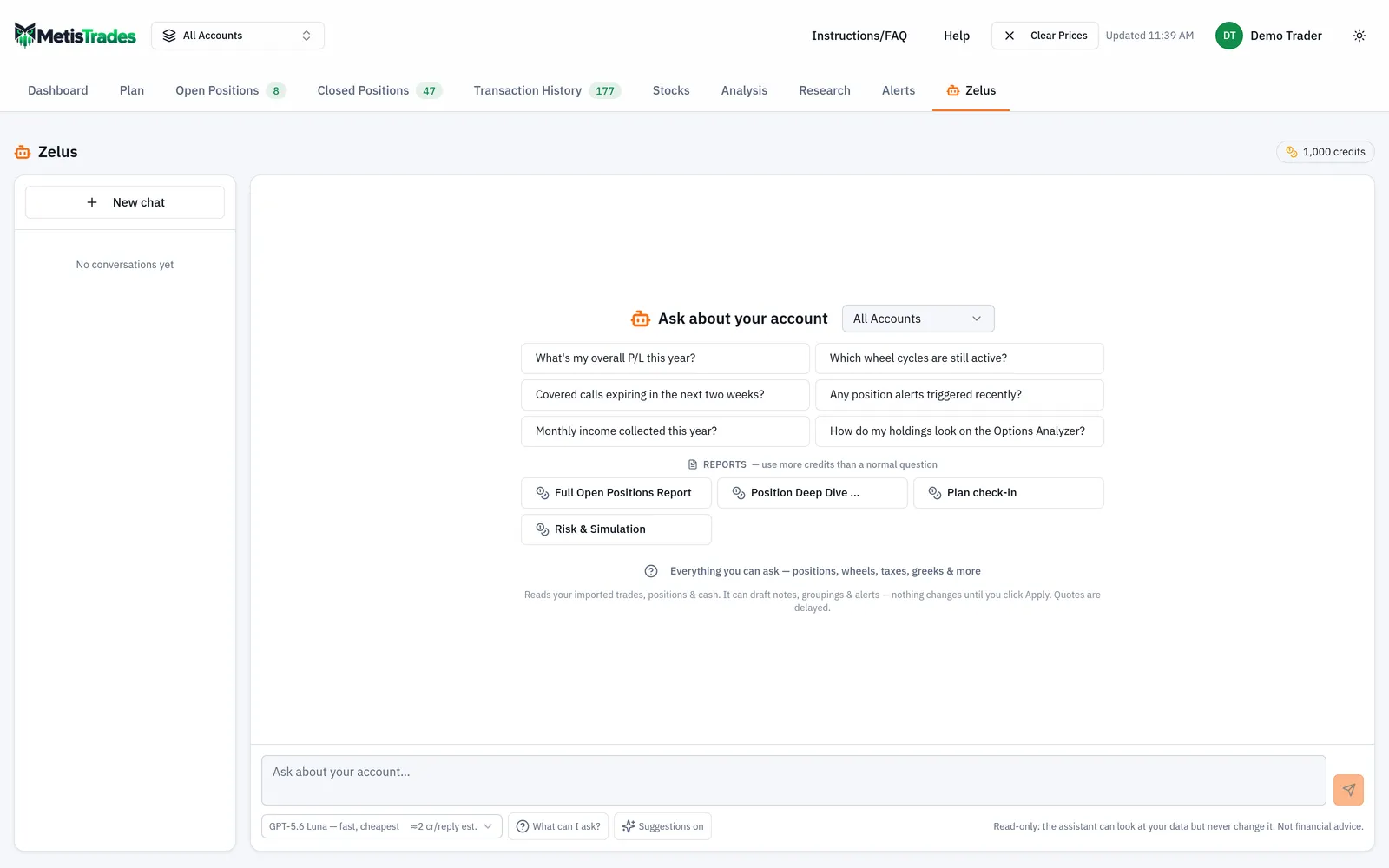
The Zelus header shows a credit meter with your total available balance — that is the allowance remaining for the current month plus your purchased balance, as a single whole number. Look at the header first; the figure there is what Zelus checks before it will start generating a reply.
3. Open the Zelus credits dialog
Select the credit meter to open the Zelus credits dialog. This is where the single header number is broken apart: the dialog separates the monthly allowance from purchased credits when a purchased balance is present. If you have never topped up, you will simply see the allowance.
Read the two lines with their spending order in mind:
| Balance | What it is | When it is spent |
|---|---|---|
| Monthly allowance | Whole credits granted for the current UTC calendar month | First, until exhausted; unused allowance expires when the month changes |
| Purchased credits | Top-up or adjusted credits | Only after the month's allowance is used up; they do not expire |
| Total credits | Allowance remaining plus purchased balance | The figure shown on the header meter |
4. Look at the top-up packs
The same dialog shows the available top-up packs, their credit amounts, prices, and any bonus relative to the smallest pack. Because packs and prices are controlled by current site settings, use the offers shown on screen rather than assuming a pack you saw before is still the same.
5. Check what a model typically costs before you choose it
The model picker shows either a typical recent charge or a standard-size estimate beside available models. The ~ figure is a recent typical charge, not a quote for your next answer. The ≈ figure marked est. is a standard-size estimate, used when there is not enough qualifying recent activity to publish a typical figure. Your question, conversation history, chosen model, tool rounds and returned data can all make the actual charge differ.
6. Send one short message
Keep it under the message limit of 4,000 characters, and send only one at a time — one user can have only one Zelus reply generating at a time. A short, specific first question gives you a clean charge to read in the next step.
Check it worked
Three things tell you the setup is working.
The meter shows a positive whole number. Every displayed and stored balance is a whole number. If the dialog shows an allowance figure for the current month, your grant happened.
The dialog separates the two buckets. Once you have a purchased balance, the Zelus credits dialog lists the monthly allowance and purchased credits separately rather than as one lump.
Your answer reports its own cost. Each completed answer can show the model, input tokens, output tokens and credits charged beneath the reply. That line is the actual charge for that answer — the authoritative figure, as opposed to the picker's typical or estimated hint.
The first sign something is wrong is not reaching the chat at all: an anonymous visitor sees a sign-in prompt instead of a balance, and a signed-in user without active access is returned to Account Settings. The other early signal is a disabled composer, which means your total balance is zero or below.
Troubleshooting and common questions
The composer is disabled and says I am out of credits
Zelus checks that your total balance is positive before starting a reply. When the balance is zero or below, the composer is disabled and the page says You're out of credits. Your allowance refreshes next month — or top up now. Select Buy credits to open the top-up dialog. No further answer starts until the total balance becomes positive again.
Why is my purchased balance slightly negative?
Deduction happens after an answer completes. Zelus verifies a positive balance before starting, so the last answer can cost more than the small positive balance available when it began, and the purchased balance can go slightly below zero.
Why did one answer cost more than the picker suggested?
The picker shows either a recent median or a standard-size estimate. Your actual charge reflects the model usage for your particular answer, including conversation history, tool rounds and the data returned.
Why are there two usage rows for one answer?
The reply used the rest of your monthly allowance and then purchased credits. It is recorded as one row for the allowance part and one for the purchased part, and both rows share one reply grouping — they represent a single charged reply, not two.
My unused monthly credits disappeared
Unused monthly allowance expires automatically when the month changes, and the month is measured in UTC. Only the current month's allowance counts. Purchased credits are the balance that carries forward, because they do not expire.
The allowance changed but my balance did not
If the admin changes the allowance after your grant for that month, your already-granted amount is not retroactively adjusted.
Why was a large request answered only in part?
Across all tool rounds for one reply, Zelus can fetch at most 200 distinct option contracts that are not already satisfied by cache, and company research has a separate cold-data budget of four symbols per reply. Cached hits do not consume either budget. Each message also has a limited number of tool rounds before Zelus must produce its final answer without another lookup. Ask a narrower follow-up for the omitted part.
Are the suggested follow-ups charged?
Generating and displaying them costs you nothing, and selecting one only fills the composer. If you send it, the resulting answer is charged normally.
Does an AI I connected myself use Zelus credits?
No. An AI connected under Account Settings → AI Connections pays for its own thinking. Daily limits on tool calls, option quotes and fresh research lookups apply across all your connections and reset at midnight Eastern, and each call carries the same quote and research budgets as one Zelus reply.
What do credits actually buy?
Credits pay for generated answers — not accuracy, data completeness or investment outcomes. Quotes in MetisTrades are delayed and can be missing or stale even when a quote budget remains, and anything derived from imported transactions is an estimate.
Related guides and help pages
Related guides
- Meet Zelus: the AI assistant that answers questions about your own portfolio
- Letting Zelus draft changes for you to review
- Asking Zelus for a portfolio report: the capability browser and the one-click reports
- Connecting Claude, ChatGPT or another AI assistant to your MetisTrades data