Asking Zelus for a portfolio report: the capability browser and the one-click reports
How to find report-style questions in Zelus' "What can I ask?" browser, run a Full Open Positions Report on a focused slice of your book, and read every section of the reply without over-reading it.
What it does and when to use it
Zelus is an AI account assistant inside MetisTrades. You ask a question in plain English, it looks up the relevant records within the account scope attached to the conversation, and it explains what it found. Zelus is a Pro surface: you use it with an active subscription or lifetime access.
This guide is about one particular use of it: getting a report rather than an answer. A report-style question is one that would otherwise take you ten follow-ups — "what do I hold, what is each position worth, which ones have a plan, what breaks if the market drops 10%". Zelus packages several of these as one-click reports, and the capability browser is where you find them.
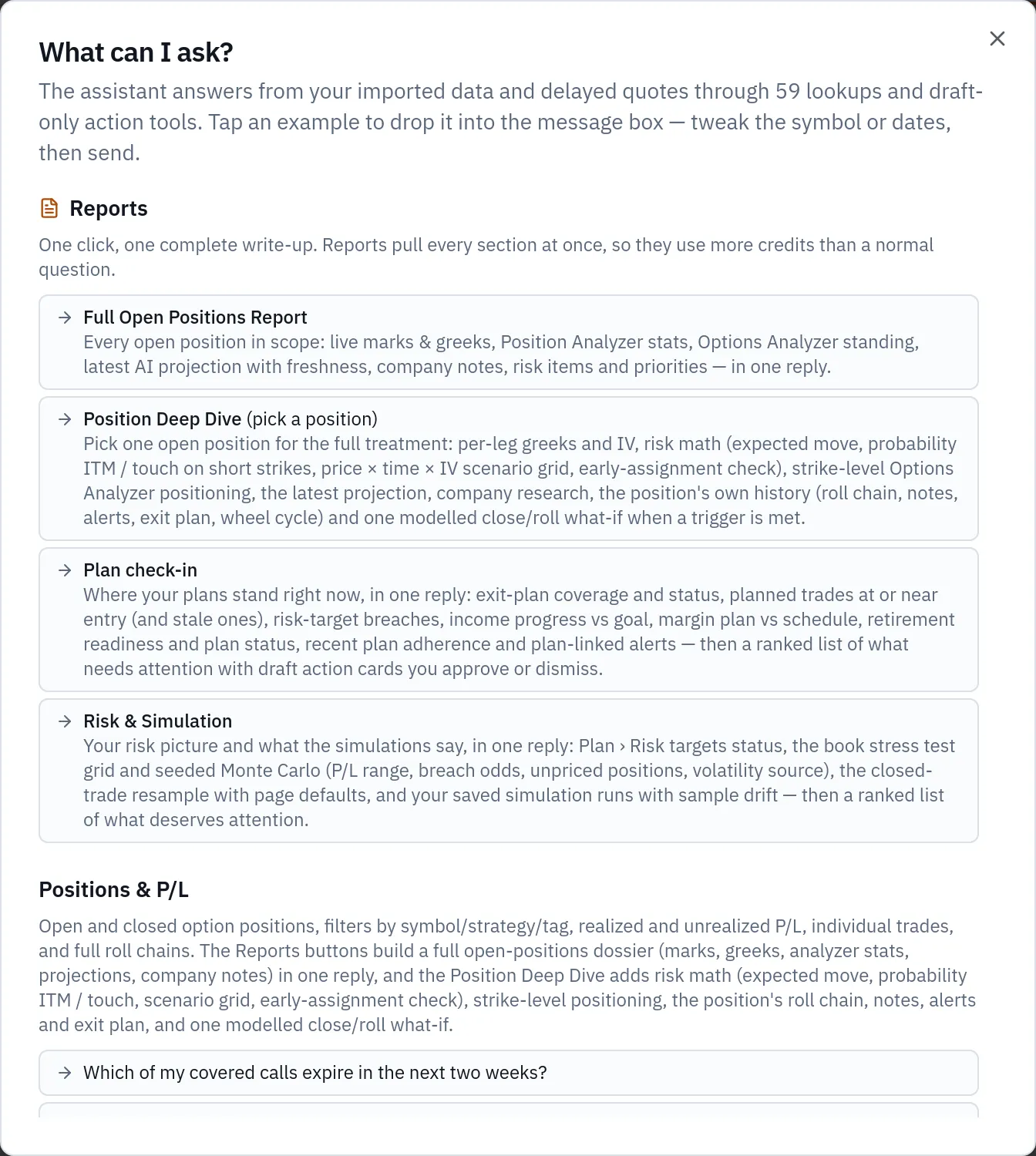
The capability browser is the dialog titled What can I ask?. It is a categorised guide to what Zelus can currently look up, with example questions you can place straight into the message box. It also shows the number of lookups and draft-only action tools available to you, and explains that answers come from your imported data and delayed quotes. Categories controlled by site flags only appear when they are available to you.
At the top of the browser sits the Reports group: Full Open Positions Report, Position Deep Dive, Plan check-in and Risk & Simulation. The two position reports pull every section at once, so they use more credits than a normal question.
Two terms you will meet along the way. Delta is the approximate dollar change in a position's value for a $1 move in the underlying; a position delta of +50 behaves roughly like 50 shares. Theta is the approximate daily dollar change from time decay alone, all else equal. Both are estimates from a model, not promises.
Use a report when you want the whole picture in one reply — a weekend review, a check before expiration week, or a handover of what you are carrying. Use a plain question when you want one number.
A worked scenario
You have 14 open positions across two accounts. Three of them are on XYZ, trading at 50.40, and you want to review just those before next week's expiration. You start a conversation in All Accounts scope and run the Full Open Positions Report, narrowed with the Tickers filter to XYZ. The dialog shows 3 open positions match, and the reply opens with "3 of 14 open positions".
The positions table comes back like this.
| Position | Strategy | DTE | Mark | Unrealized P/L | % of max profit | Breakeven | PoP | Delta | Theta |
|---|---|---|---|---|---|---|---|---|---|
| XYZ 100 sh / −1 52C | Covered Call | 23 | 0.96 | +$412 | 54% | 44.60 | 71% | +62 | +1.80 |
| XYZ −2 45P / +2 40P | Put Credit Spread | 16 | 0.42 | +$186 | 63% | 44.07 | 78% | +11 | +2.40 |
| XYZ −1 47.5P | Cash Secured Put | 44 | 2.11 | −$40 | −23% | 45.79 | 66% | +30 | +1.95 |
The portfolio snapshot above the table adds those up: net unrealized P/L of 412 + 186 − 40 = +$558, net delta of 62 + 11 + 30 = +103, and net theta of 1.80 + 2.40 + 1.95 = +$6.15 a day.
The Portfolio stress rollup shows net unrealized P/L after a same-day move of −10%, −5%, +5% and +10%: −$118, +$256, +$798 and +$912. The rest of the reply covers the Options Analyzer standing for XYZ, the latest AI projection, company notes, and four more rollups. We read those in section four.
Step by step in MetisTrades
1. Open Zelus and choose the account scope
Go to Top nav → Zelus. The new-chat screen is headed Ask about your account, and its scope picker offers All Accounts and each of your individual trading accounts. Choose before you start: once a conversation begins, its scope is pinned, and you cannot change it afterwards. For the XYZ review above, All Accounts is right because the three positions sit in two different accounts.
2. Open the capability browser
On the new-chat screen, select Everything you can ask — positions, wheels, taxes, greeks & more. Inside a conversation, select What can I ask? below the composer. Look at the category list and the counts of available lookups: the categories are the shape of what Zelus can reach, and anything missing is simply not available to you.
3. Pick a report, or copy an example question
The Reports group is first. Below it, categories such as Positions & P/L, Plan, Quotes, greeks & price history and Tax lots each carry sendable examples — "Which of my covered calls expire in the next two weeks?", "Am I inside my risk targets right now — what is breached?". Selecting an example fills the composer; it is not sent until you send it, so you can swap the symbol or dates first.
4. Set the focus on the Full Open Positions Report
Selecting Full Open Positions Report opens a dialog where you can Run on everything or narrow the book by Tickers, Expiration (all, a rolling window of upcoming days, or a Custom range), Account and Strategy. Filters combine, and the dialog shows how many open positions match as you set them. For the scenario, enter XYZ under Tickers, confirm the match count reads 3, then select Run focused report.
Position Deep Dive instead opens a chooser listing the open positions in scope, so you pick one. Plan check-in and Risk & Simulation run straight away on the conversation's account scope.
5. Or type the question yourself
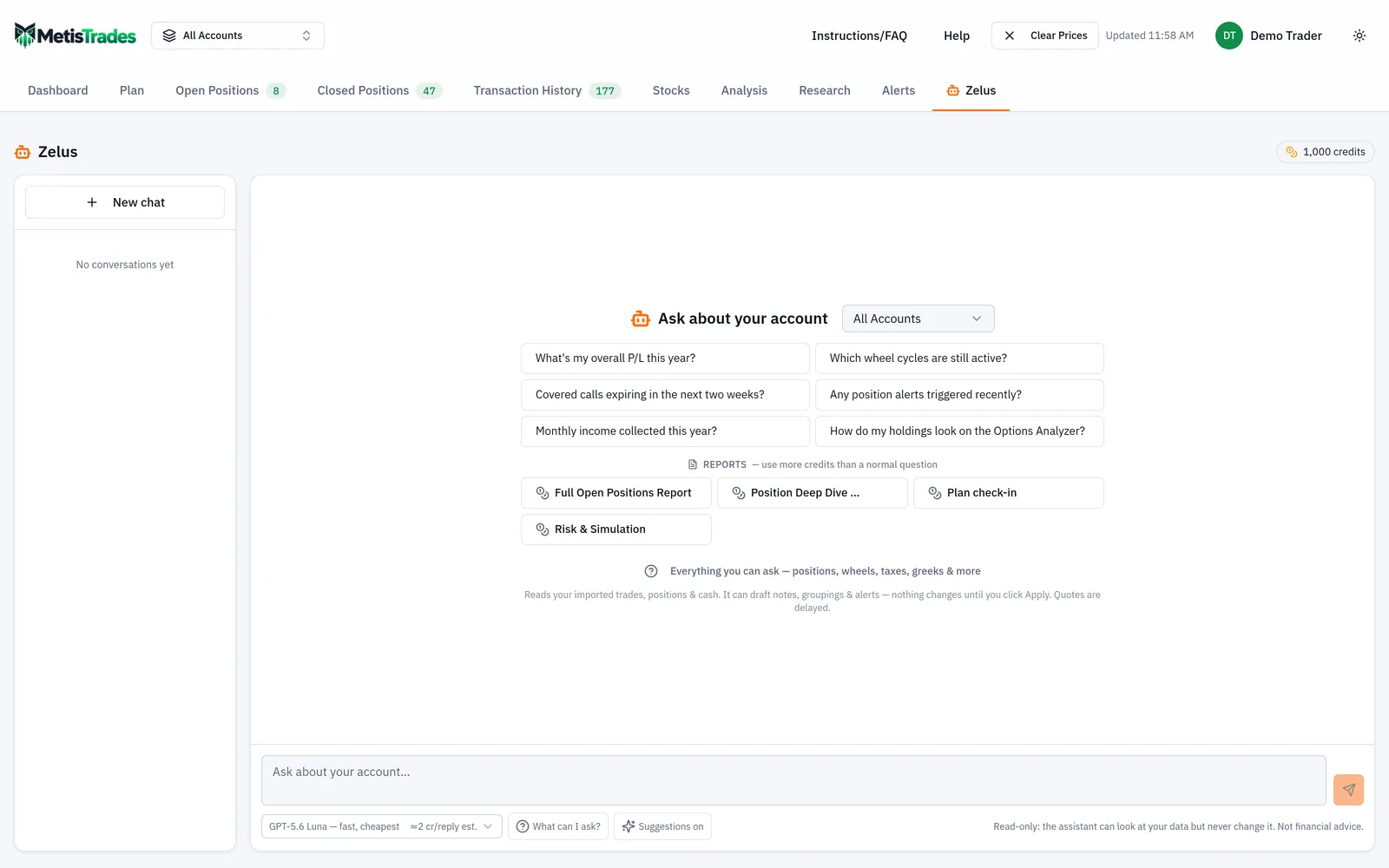
You do not have to use a button. The composer names the pinned account scope and takes questions up to 4,000 characters; Enter sends, Shift+Enter adds a line. The screenshot below shows a report-style question being typed in — note the model picker and its credit label before you send.
6. Choose a model and send
The model picker sets the model for the next reply and is remembered as your default. A cost label beginning with ~ is the typical whole-credit charge seen for that model lately; a label beginning with ≈ and ending in est. is an estimate because there is not yet enough recent usage. Your actual charge depends on the question and the data Zelus reads, and the tokens and credits charged appear below the answer. Reports cost more than a normal question.
While the reply builds you may see Thinking…, Analyzing what it found… or lines beginning Looking at, which change to Looked at as each lookup finishes. The send control becomes a stop control if you want to end a long answer early.
How to read the results
The header. "3 of 14 open positions" is the most important line in a focused report. Every table, total and rollup below it covers only those three positions. The +$558 is the unrealized P/L of your XYZ book, not of your account.
Unrealized P/L and marks. The +$412 on the covered call is an estimate: it uses your imported transactions for the cost side and the latest available price for the current side, and quotes in MetisTrades are delayed. A mark is a reference value for valuation, not a price you are guaranteed to trade at. If the exact figure matters, check the position page and your broker.
Delta and theta. Net delta +103 means the three positions together behave roughly like 103 shares of XYZ for a small move. Net theta +$6.15 means time decay works in your favour by about that much a day, all else equal — and "all else equal" is doing real work there, because a move in XYZ or in implied volatility changes both numbers.
Probability of profit. The 78% on the put credit spread is estimated from current implied volatility and time under a lognormal price model. It is a modelled chance at the modelled horizon, not a track record, and it says nothing about how large the 22% looks when it happens. Read it next to the breakeven (44.07) and the maximum loss on the spread.
The stress rollup. Compare the stress row with the delta you were just given. A 5% rise in XYZ is +$2.52; 103 × 2.52 = $259.56, so a delta-only estimate says about +$260 of gain. The report's +5% row shows net unrealized P/L of +$798, a change of 798 − 558 = +$240. Delta is a first-order estimate that changes as the stock moves, so the two will not match exactly. The gap is the point: the stress row is a better answer than multiplying delta by the move.
Plan & alert coverage. This rollup reports how many of the reported positions have an exit plan, armed alerts, or neither, and names the uncovered ones and the plans near their target or past their time exit. In the scenario, the cash secured put has neither — a specific, fixable finding.
Concentration. On a focused report this is concentration within the focus. Narrowed to XYZ, it tells you nothing about how much of your whole book is in XYZ. Run on everything when that is the question.
Margin & risk targets. Loan-to-value is shown against your limits, and each Plan → Risk dial is marked within, out or unknown. A dial of unknown means a quote or input was missing — never that the level was met. Treat unknown as "go and look", not as a pass.
Options Analyzer and projections. The analyzer table gives score, trend and last flip, or not tracked when the symbol is not on the watchlist. The projections table shows predicted versus current price, bias, and whether the latest AI projection is fresh, stale or none. A projection counts as stale when it is older than the site's threshold (14 days by default, adjustable by an admin) or its target date has passed. Stale means out of date, not wrong, and Zelus never claims to have run a projection itself.
The Checked line. Below a saved answer, Checked: summarises the distinct lookups used for that reply, showing up to six items followed by a count of the rest. It tells you which account or market-data lookups Zelus used; it does not replace checking the underlying portfolio page when exact records matter.
Follow-ups. After a successful answer Zelus can offer up to four follow-up chips. Selecting one places the question in the composer for you to review — it does not send automatically.
Limits and assumptions
Everything derived from imported transactions is an estimate. A missing opening trade, transfer, fee or assignment changes grouping, cost basis and P/L, and Zelus cannot infer missing broker transactions or fix an incorrectly imported position from chat.
Quotes are delayed. Zelus uses the latest available price, so read "right now" that way, and accept that some option contracts may have no quote at all.
Answers are bounded by the conversation's pinned account scope. If you started in a single account, the report cannot see the rest of your book, and you cannot change the scope afterwards.
Modelled figures — probability of profit, breakevens, greeks, the stress grid — depend on model assumptions and available prices. They are not predictions, guarantees or advice.
On a very large book the report trims the least important detail first (company snapshot, then Options Analyzer extras, then per-leg detail) and says what it trimmed; every position still appears in the table.
Where action drafting is enabled, suggestions such as a new projection run arrive as approval cards. Nothing is saved or run until you select Apply, and Zelus cannot place, modify or close brokerage orders, or edit or delete existing data. Any tax figures you ask about are estimates from your imported transactions, not tax advice, and not a substitute for your broker's 1099-B.
Common mistakes
- Reading a focused report as a portfolio report. The totals, concentration and stress rows cover only the filtered set — check the "N of M open positions" header, or re-run with Run on everything.
- Starting the chat in the wrong scope. Scope is pinned at creation; start a New chat and pick All Accounts when you want the whole book.
- Treating a mark as a fill. The 0.96 on the covered call is a delayed reference value; price the close at your broker before acting on it.
- Reading an "unknown" risk dial as "within target". Unknown means an input or quote was missing — open the Plan → Risk page and find out which.
- Taking a high probability of profit as a verdict. Read the 78% next to the breakeven, the maximum loss and the position size before deciding anything.
- Burning credits on a full report for one number. Reports pull every section and cost more; for "what's my delta on XYZ?", ask that question instead.
- Assuming a draft card was applied. A card is a proposal until you select Apply; scroll back and check the ones you meant to keep.
Related guides and help pages
Related guides
- Meet Zelus: the AI assistant that answers questions about your own portfolio
- Plan, Track, Optimize: a complete tour of MetisTrades
- Trade Path: how far each closed trade ran for and against you
- Replaying one options trade with Trade Backtest
- Letting Zelus draft changes for you to review
- How Zelus Credits Work: Allowance, Top-Ups and What a Reply Costs