Exit plans: deciding how you will leave a trade
Write your profit target, max loss and time exit before you need them, track them in a simple journal, and score how you actually left each trade. Then see how MetisTrades records and scores the same plans.

What it is and why it matters
An exit plan is the set of conditions you decide, in advance, that will make you close a position. It usually has three or four parts:
- Profit target — the gain at which you take the money and leave. For a credit trade this is often expressed as a percentage of the premium you collected.
- Max loss — the loss at which you close regardless of what you still believe. Often written as a multiple of the credit, or as an underlying price level.
- Time exit — a date, or a number of days to expiration (DTE), at which you close whatever the price is doing.
- Intent — a sentence in your own words about why you put the trade on and what would change your mind.
The reason to write these down before you need them is simple: the moment you need them is the worst moment to invent them. A short put that has gone against you is a position you now have an opinion about. The number you would have accepted as a stop on the day you opened it is more honest than the number you will accept once you are down.
Two pieces of vocabulary, because the arithmetic below depends on them. Credit is money you collect when you open a trade; a debit is money you pay. Option prices are quoted per share, and a standard equity option contract usually represents 100 shares, so a credit of 1.60 per share on one contract is $160 of cash. (Mini options and futures options use different multipliers, so do not assume 100 every time.) Buying back a short option means paying a debit to close it; if you sold it for 1.60 and buy it back at 0.80, you keep the 0.80 difference per share.
Writing a plan does not place an order anywhere. It is a record of a decision. The value comes later, when you can look back at twenty closed trades and see how many you actually exited the way you said you would. That is the number almost nobody tracks, and it is usually more revealing than the profit and loss itself.
How to track it by hand
You need one row per trade, filled in twice: once when you open the position and once when you close it. The opening half is the plan. The closing half is the score.
The columns
Record Opened, Position, Contracts, Credit / share, Profit target % and Max loss / share on the day you open. Three columns compute themselves:
- Target buyback = credit × (1 − target %). This is the price you would pay per share to close and bank the target.
- Realized P/L = (credit − actual exit) × 100 × contracts.
- Followed plan? compares the actual exit price with the target buyback and the max-loss line.
The Max loss / share column is the price at which you buy the position back whatever your current view is. Writing it as a price per share, rather than a dollar loss, makes it something you can check against a quote in one glance.
The spreadsheet below already has these columns, the three formulas, and the worked example filled in.
Download the template: Exit plan journal (.xlsx). It opens in Excel, and in Google Sheets via File → Import. The worked example from this guide is already filled in, and the formulas carry down into the blank rows.
The worked example
| Opened | Position | Contracts | Credit / share | Profit target % | Max loss / share | Target buyback | Actual exit / share | Realized P/L | Followed plan? |
|---|---|---|---|---|---|---|---|---|---|
| 2026-01-05 | XYZ 50 put | 1 | 1.60 | 50% | 3.20 | 0.80 | 0.80 | 80 | Target hit |
| 2026-01-12 | ABC 30/27 put spread | 2 | 1.00 | 60% | 2.00 | 0.40 | 2.00 | -200 | Stopped |
| 2026-01-20 | DEF 40 put | 1 | 1.20 | 50% | 2.40 | 0.60 | 0.90 | 30 | Exited early |
| Totals | -90 | 3 plans closed |
Walking the arithmetic
Row 1, XYZ 50 put. You sold one put for a credit of 1.60 per share and wrote down a 50% profit target and a max-loss line at 3.20 per share, which is twice the credit. The target buyback is 1.60 × (1 − 0.50) = 0.80. You closed at 0.80. Realized P/L is (1.60 − 0.80) × 100 × 1 = $80. Because the exit price landed at the target buyback, the journal reads Target hit. This is the clean case: planned, executed, scored.
Row 2, ABC 30/27 put spread. Two contracts, credit 1.00 per share, a 60% profit target and a max-loss line at 2.00 per share, twice the credit again. The target buyback is 1.00 × (1 − 0.60) = 0.40. The trade went the wrong way and you bought it back at 2.00. Realized P/L is (1.00 − 2.00) × 100 × 2 = −$200. Because the exit price was at or beyond the max-loss line, the journal reads Stopped. Note that this row is scored as having followed the plan in the sense that matters: the loss stopped where you said it would. A plan that gets honoured on the bad trades is doing its job.
Row 3, DEF 40 put. One contract, credit 1.20, 50% target, max loss 2.40. Target buyback is 1.20 × (1 − 0.50) = 0.60. You closed at 0.90, which is better than the credit but short of the target. Realized P/L is (1.20 − 0.90) × 100 × 1 = $30, and the journal reads Exited early. You made money and still broke the plan. That is exactly the kind of row that disappears if you only track profit and loss.
Totals. Three plans closed, realized P/L of 80 − 200 + 30 = −$90 for the month. One target hit, one stop honoured, one early exit. The useful question is not "why am I down $90" but "if I had held row 3 to its 0.60 target, would the month look different, and do I have enough rows to say?" With three trades you do not. With thirty you start to.
The classification formula uses a small tolerance so that an exit at 0.795 against a 0.80 target still counts as a target hit rather than an early exit. Pick a tolerance and apply it consistently, otherwise you will score yourself as undisciplined every time a fill comes in a cent off.
Where manual tracking breaks down
The journal above works perfectly for three tidy trades. Here is what actually goes wrong.
- Rows never get written. The plan has to be entered at the moment you open the trade, which is the moment you are least inclined to open a spreadsheet. Plans written a week later are not plans, they are rationalisations, and plans never written leave holes that make the adherence percentage meaningless.
- Partial fills. You sold five contracts and bought three back at the target, then the rest at a worse price. One row with one exit price cannot express that. You end up averaging, and the average quietly hides a rule you broke on two contracts.
- Rolls. You close the January put and open a February put at a different strike in the same order. Is that an exit or a continuation? If you treat it as an exit, every roll scores as "exited early" at a small profit. If you treat it as a continuation, your plan's target and stop no longer match the position they refer to, because the credit changed.
- Assignments. A short put that gets assigned never has an exit price per share. The position becomes 100 shares. The plan's buyback column has nothing to compare against, and the row sits unscored.
- Time exits. "Close at 21 DTE" requires you to know, every day, which positions have hit 21 days. A spreadsheet will not tell you unless you build an expiration column and look at it daily.
- Multiple accounts. The same ticker and strike can be open in two accounts with different plans. One line per position is no longer enough to identify which plan belongs to which.
- Corrections. You discover a trade was grouped wrongly, or an opening transaction was missing. The credit changes, so the target buyback changes, so the score changes, and you have to walk back through the rows.
None of these are hard individually. All of them together mean the journal is accurate for a month and then stops being trustworthy.
How MetisTrades does it
MetisTrades keeps exit plans against your imported positions, evaluates them against delayed quotes, and scores them once the position closes. The plan is a tracker: it never places, changes, or closes a trade. You need a signed-in account with active access to use the Plan tab; an anonymous visitor who opens Plan sees Sign In Required.
Starting from a position
On Open Positions, each of your positions carries a Plan status chip. If there is no plan yet, it reads Add plan. Selecting the chip opens the same exit-plan editor you would reach from the Plan tab, so you can write the plan in the moment you were going to look at the position anyway.
The Plan › Positions page
Top nav → Plan → Positions brings every open option position and every stock holding with known cost basis into one list. Summary badges count how many are planned, how many are without a plan, and how many have been scored. Quotes as of shows the time of the loaded quotes, with Refresh quotes next to it; if quotes are unavailable the page says so and price-based statuses read as No data.
The screen below is the whole workflow in one place: the status of each open plan, the Upcoming expirations card, and the adherence list for plans that have already closed.
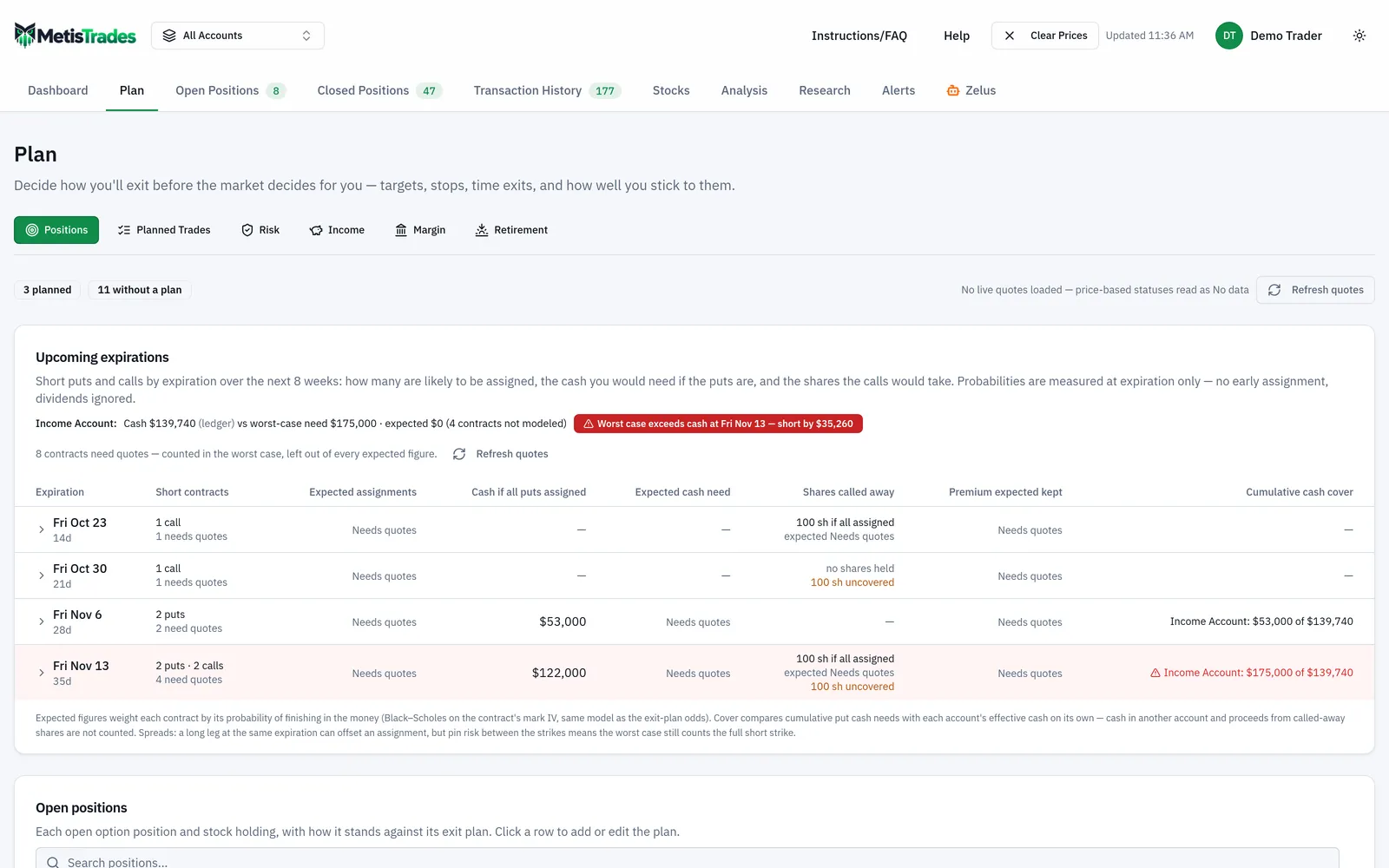
The table columns are Symbol, Account (in All Accounts mode), Strategy, DTE, Live P/L, % of max, Plan, Status, Odds and Actions. Planned rows appear first by default, most urgent status at the top, then a Without a plan divider. That divider is the fastest answer to the question the hand journal cannot answer: which open trades have no written exit at all.
Writing the plan
Selecting a row or Add plan opens New exit plan. The editor shows Max profit, Live P/L, % of max or Shares, and DTE or Last price as context, then lets you set:
- Profit target — % of max profit where a maximum profit is available, or Fixed dollars.
- Max loss — an Unrealized loss (dollars) line, and optionally an Underlying price stop (optional) set At/below or At/above a price. Use breakeven fills that stop with the position's expiration breakeven and picks the direction for you.
- Time exit — At N days to expiration for options, or On a calendar date.
- Intent — your reason or instructions in your own words.
At least one target, stop, time exit or intent note is required. The Template dropdown above the fields can fill the form from a built-in template such as 50% profit · 21 DTE or Profit 50% · stop 2× credit, or from one you saved. Picking a template only fills the form; nothing is saved until you select Create plan. A stop written as a multiple of the credit is converted to dollars from the position's own net credit, which is the same arithmetic the journal's max-loss column was doing by hand.
Status with these levels previews how the position compares with your draft before you save it.
Rolls and alerts
When a planned position closes through a recognized roll into an open successor in the same account, a Rolled positions with a plan section offers Carry plan forward. It is your choice, not automatic. A DTE-based time exit carries over because it stays relative to expiration; a calendar-date exit does not.
After you save an option plan, Alerts from this plan shows which levels can become position alerts: a profit target maps to an above-threshold alert, a max loss to a below-threshold alert, an underlying stop to an underlying-price alert, and a time exit to a DTE alert on the nearest-expiring eligible leg. Creating them requires an active subscription and the site Alerts feature flag, which is currently in testing. Stock plans do not offer alerts, because those alerts need an option leg to watch.
Scoring
Once imported transactions show the planned position has closed, the Plan adherence section lists Closed, Symbol, Strategy, Plan, Outcome, Realized and vs target. If nothing has scored yet, it says so.
How to read the results
Open-plan statuses
While a position is open, its Status is one of On track, Near target, Target hit, Past time exit, Stop breached, or No data. When several apply at once the priority is stop breached, then target hit, then past time exit, then near target, then on track. Near target starts at 80% of the way to the resolved profit target, so it is an early warning rather than a signal.
No data means a price-based level needs quote data that is not available. It does not mean the level was not crossed; quotes are delayed, and a status reflects only the latest available values. A calendar-date time exit can still be evaluated without quotes.
Odds and EV
For planned option positions the Odds column estimates the chance the target is reached first, the chance the stop is reached first, and the chance neither has happened by the horizon, with EV (expected P/L under the plan) below. Hovering shows the breakdown including Tail loss (avg worst 5%) and the assumptions. These are model estimates under a lognormal underlying at constant implied volatility, checked once per calendar day, ignoring earnings, dividends, early assignment and spreads. They are not forecasts. Odds are Pro only, and the cell can read Needs quotes, Unbounded max, Not modeled, No levels, Exit due, Out of range or Expires today instead of numbers when it cannot support a figure.
Adherence outcomes
A closed plan scores as Stopped out, Followed plan, Exited early, Exited late, or Unclassified. Stopped out takes priority and means realized P/L closed at or below your max-loss line. Followed plan means you reached the profit target, or exited at the planned time line, or had only a max-loss line and closed inside it. Exited early means you closed before the target and before the time exit. Exited late means more than three days after the time line without reaching the target. Unclassified means the plan had no measurable level, which is what an intent-only plan gets.
The target counts as reached within a tolerance of $5 or 5% of the target, whichever is larger, which is the app's version of the half-cent tolerance in the spreadsheet formula. vs target is realized P/L minus the resolved dollar target, and it is blank when there is no resolved target.
What these outcomes do not tell you: whether the plan was a good plan. Followed plan on a trade that lost money is still discipline, and Exited early on a profitable trade is still a broken rule. Read the outcome mix alongside realized results, and remember that everything derived from imported transactions is an estimate that missing imports, transfers, grouping or unusual multipliers can change. An underlying-price stop affects open status, but close-out scoring uses realized P/L, the target, the max-loss line and the time exit only.
Common mistakes
- Writing the plan after the trade moves. A target set once you are down is a hope, not a rule. Open the editor from the Plan chip on Open Positions the same day you open the position.
- Saving only an intent note. It is enough to save a plan, but it creates no measurable condition and will later score Unclassified. Add at least one target, stop, or time exit.
- Assuming a plan or alert closes the trade. Neither places, changes, or closes an order. Keep your own broker order or your own routine for acting on the status.
- Expecting a plan to follow a roll by itself. It does not. When an eligible successor is detected, select Carry plan forward, and remember that a calendar-date time exit will not carry.
- Scoring an early exit as a win because it made money. Row 3 of the worked example made $30 and still broke the rule. Count the outcome and the dollars as two separate facts.
- Multiplying premium by 100 without checking. Mini options and futures options use different multipliers, and position-level P/L alerts are not offered for non-standard multipliers at all.
- Treating a delayed-quote status as proof. Stop breached and No data both describe the latest available quote, not every price in between. Use Refresh quotes and check the Quotes as of time before acting on a borderline reading.
Related guides and help pages
Related guides
- Plan, Track, Optimize: a complete tour of MetisTrades
- MFE and MAE explained: are you closing winners too early?
- Planning Your Portfolio: A Tour of the Plan Tab
- Setting and Tracking an Options Income Goal
- Planning a Margin Paydown: Setting a Destination LTV and Tracking Progress
- Planning retirement income from an options portfolio