Planning Your Portfolio: A Tour of the Plan Tab
The Plan tab records what you intend to do — exits, entries, risk limits, income, margin paydown and retirement — then measures the gap against your actual book. Here is how the six sections fit together, followed through one worked example.

What it does and when to use it
Every other tab in MetisTrades describes what already happened in your accounts. Plan records what you intend to happen and measures the gap. The heading under the page title sums up the idea: decide how you'll exit before the market decides for you.
Plan has six sub-tabs, each a self-contained section:
- Positions — an exit plan for each open position: profit target, max-loss line, time exit and your intent, with live status against delayed quotes and a score once the position closes.
- Planned Trades — a watchlist of trades you intend to open, with entry conditions, an entry-hit signal, an estimated buying-power need and an optional entry alert.
- Risk — your own portfolio risk limits (concentration, beta-weighted exposure, cash reserve and more) compared with the estimated exposure of your open book.
- Income — an income goal, the income you have actually booked, and estimated income paths for the next twelve months and beyond.
- Margin — a dated margin paydown plan, the monthly amount it requires, and whether your actual margin debt is ahead of or behind schedule.
- Retirement — one retirement plan combining the nest egg, dividends, option premium, interest, margin and contributions: when you can retire, what you can spend, whether the money lasts, and whether you are ahead of or behind your own plan.
Some terms those sections rely on. An exit plan is a saved intention for one open position: where you will take profit, where you will cut the loss, when you will leave regardless of price, and why you put the trade on. A planned trade is a trade you have not placed yet — a watchlist entry with optional legs, an entry condition and a size. It is never a broker order. Entry hit means the planned trade's underlying-price condition is currently met on the latest available delayed quote. A risk target is a personal limit you set, compared with an estimated actual figure. An income goal is the income amount you want to book per period, compared with what your imported transactions show you actually collected. A margin paydown plan is a target loan-to-value or a margin-free date, turned into a monthly schedule and compared with your actual margin debt.
Use Plan when you keep changing your mind mid-trade, when you want one place to see whether this month's option premium is keeping pace with a goal, or when you are carrying margin debt and want the paydown written down as a schedule rather than a vague intention. Plan does not trade: plans, goals and targets live in this app only, and nothing here places, changes or closes an order.
A worked scenario
You have one trading account worth $240,000. Your largest holding is 300 shares of XYZ at $104, so $31,200 of stock, which is 31,200 ÷ 240,000 = 13% of the portfolio. Cash on hand is $18,000, or 7.5%. Margin debt is $22,800.
Against the shares you have sold 3 covered calls at the $110 strike, 38 days to expiration, for $1.20 each. A standard equity option contract represents 100 shares, so the credit is 3 × $1.20 × 100 = $360.
Here is what you want to write down, and the arithmetic behind each number.
| Plan section | What you set | The arithmetic |
|---|---|---|
| Positions | Profit target: buy the calls back at $0.48 | 3 × $0.48 × 100 = $144 to close; $360 − $144 = $216 kept, 60% of the credit |
| Positions | Max-loss line: close if the calls reach $3.60 | 3 × $3.60 × 100 = $1,080 to close; $1,080 − $360 = $720 loss on the option legs |
| Positions | Time exit: 7 days before expiry | 38 DTE at entry, so the time exit sits at 31 days in |
| Planned Trades | Sell 1 XYZ $95 put, 45 DTE, when XYZ trades at or below $100 | Cash to secure it: 1 × $95 × 100 = $9,500 |
| Risk | No single position above 15%; cash reserve at least 10% | XYZ is 13% (inside); cash is $18,000 of $240,000 = 7.5% (below target) |
| Income | $1,500 booked per month | This month: $360 + $400 premium + $180 dividends = $940; gap = $560 |
| Margin | Margin-free in 20 months from a $24,000 balance | $24,000 ÷ 20 = $1,200 per month; after 2 months the schedule says $21,600, actual is $22,800, so you are $1,200 behind |
Everything that follows uses these figures.
Step by step in MetisTrades
1. Open the tab
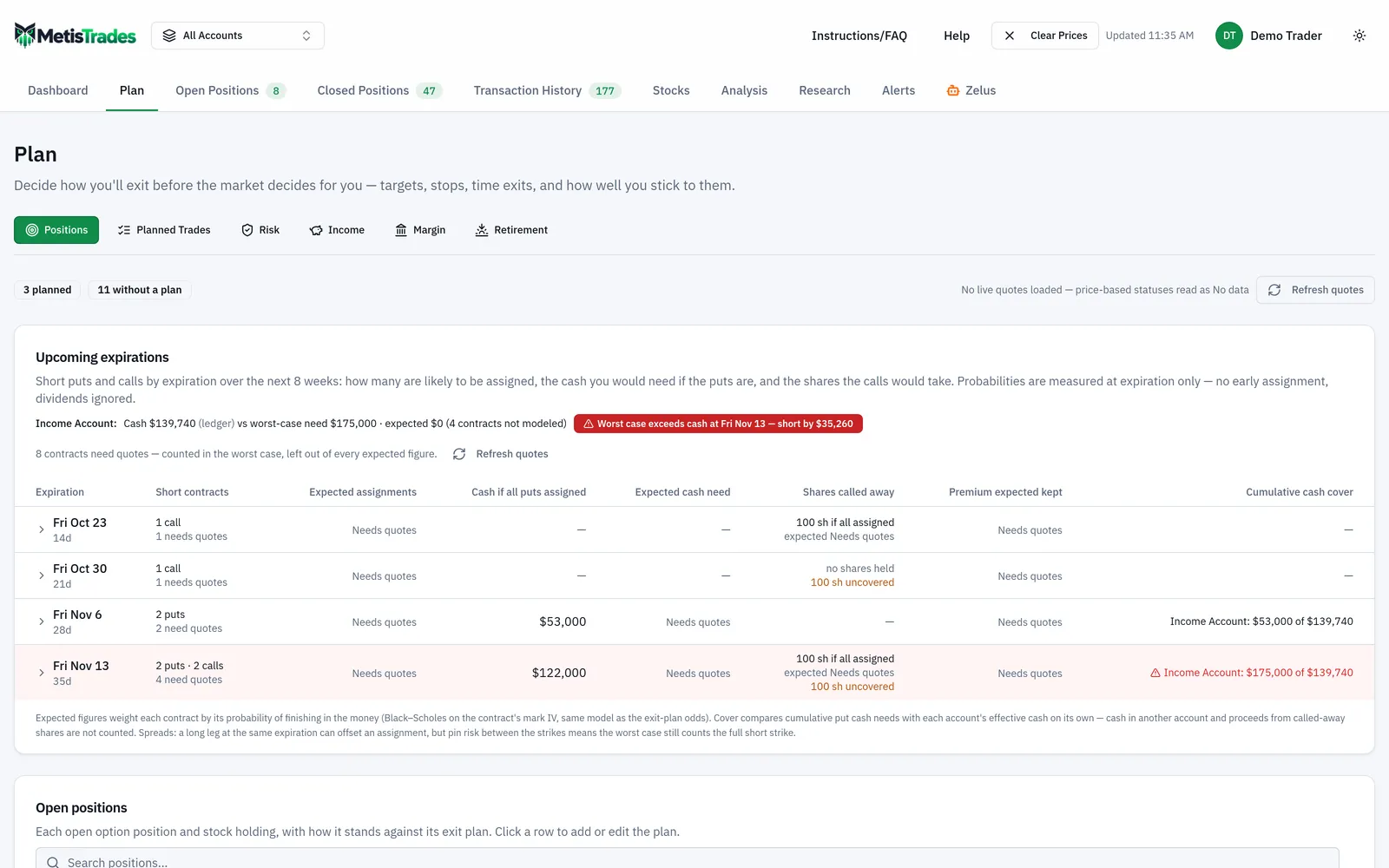
Plan sits second in the top nav, between Dashboard and Open Positions. Selecting it opens on Positions. Each section keeps its own address, so you can bookmark the one you check most often. Plan needs a signed-in account with active access (a subscription or lifetime access). If you are browsing anonymously after uploading a file, every sub-tab shows the same Sign In Required card with a Sign In button and a Start Free Trial link — plans are saved to your account, not to the browser session.
2. Write the exit plan for the XYZ calls
Two routes reach the same dialog. From Plan → Positions, or from Open Positions, where the Plan column on a position row shows the plan status chip — or Add plan if there is none — and selecting it opens the exit-plan dialog. Enter the profit target, the max-loss line, the time exit and your intent: "income on a core holding, happy to be called away at $110." The plan is saved as soon as you save the dialog.
Look at the status chip on each row and at which open positions have no plan at all.
3. Add the planned trade
On Planned Trades, create the XYZ $95 put as a watchlist entry with its legs, the entry condition (XYZ at or below $100) and the size. The section shows the entry-hit signal and an estimated buying-power need — the $9,500 above — and lets you attach an optional entry alert. Nothing here is sent to a broker.
4. Set your risk targets
On Risk, enter your own limits: the 15% single-position cap and the 10% cash reserve from the scenario, alongside the other available targets such as beta-weighted exposure. Each is shown against the estimated exposure of your open book.
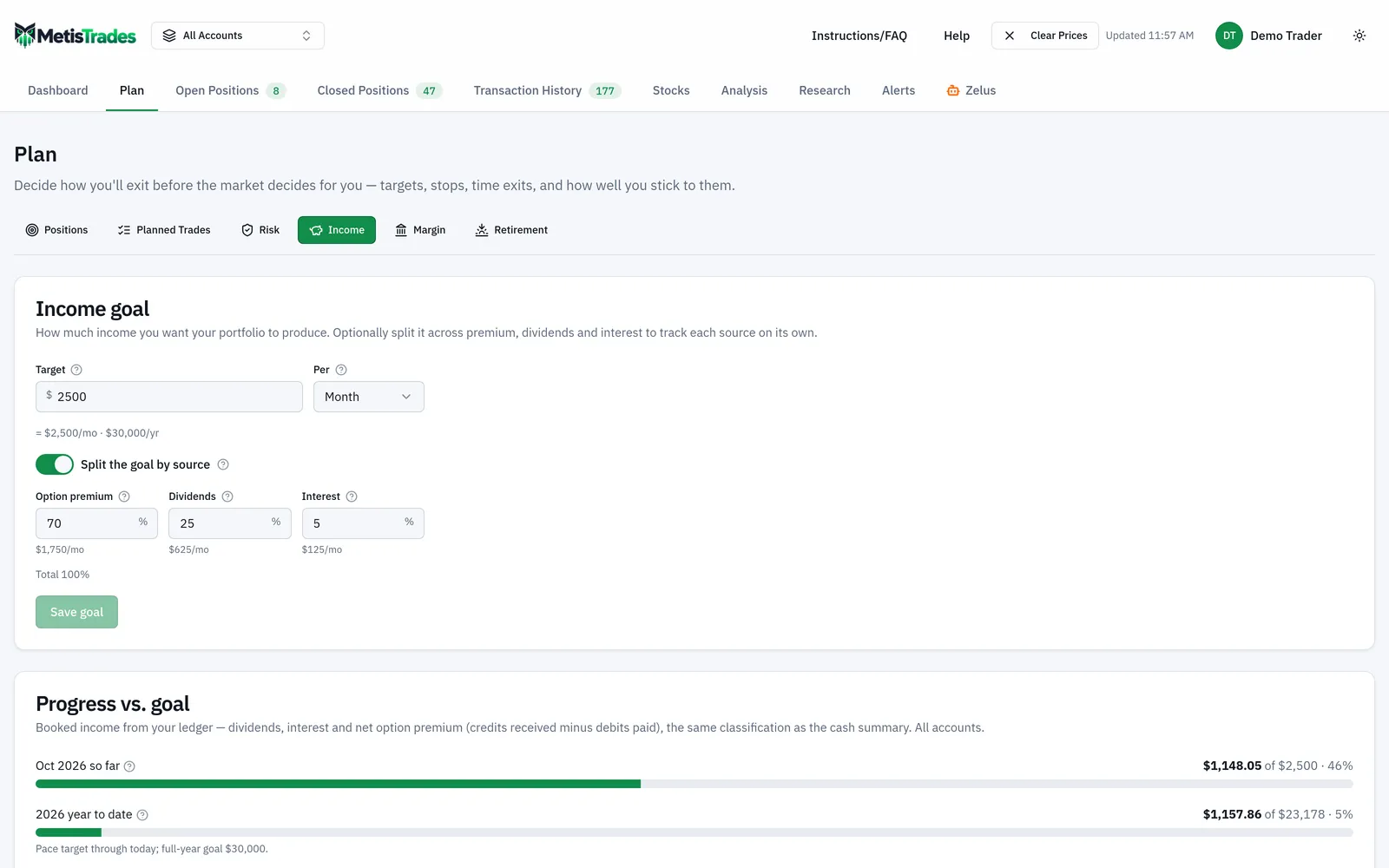
5. Set the income goal
On Income, set $1,500 per month. The section compares it with the income your imported transactions show you actually booked, and shows estimated income paths for the next twelve months and beyond. Look at this month's booked figure next to the goal before you look at anything else.
6. Set the margin paydown plan and the retirement plan
On Margin, enter the margin-free date 20 months out. The section turns it into the $1,200 monthly amount and compares your actual margin debt with the schedule. On Retirement, you keep one plan that combines the nest egg, dividends, option premium, interest, margin and contributions, and reports when you can retire, what you can spend, whether the money lasts, and whether you are ahead of or behind your own plan.
7. Check the account scope
Plan respects the trading-account selector in the header. With one account selected you see that account's plans, goals and targets. In All Accounts mode, Positions and Planned Trades show every account's items with an account badge, and the goal-style sections — Risk, Income, Margin and Retirement — work on the combined figures.
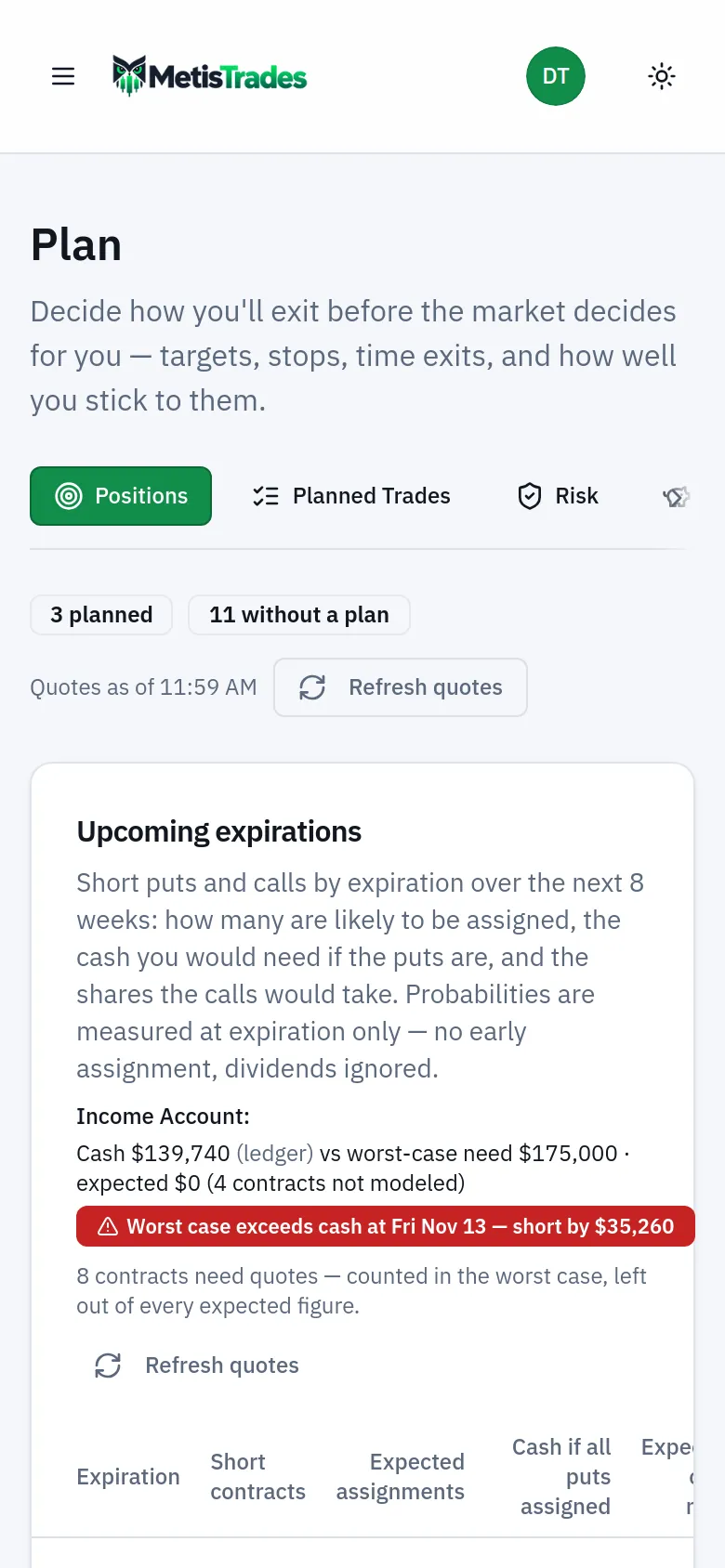
The last screenshot shows the Plan sections on a small screen; note where the sub-tab row sits and the order the cards appear in.
How to read the results
Every planning item carries a plain-language status — for example on track, near target, past time exit, ahead of plan, behind plan — so you can scan for what needs attention.
The exit plan. While the XYZ calls are open, the status is measured against delayed quotes. "Near target" means the latest available price puts the cost to close close to your $0.48 line; it does not mean an order would fill there. "Past time exit" means the date you chose has arrived, whatever the price is doing. Once the position closes, the plan gets a score. The score says how closely you followed the plan you wrote, not whether the plan was a good one.
The planned trade. An entry-hit signal means the underlying-price condition is met on the latest available delayed quote. It is not a recommendation and not an order. The $9,500 buying-power figure is an estimate of what the trade would need, not a check your broker has performed.
The risk targets. XYZ at 13% is inside your 15% cap. Cash at 7.5% is below your 10% reserve, so that target reads as breached. Both are comparisons between a limit you chose and an estimated figure from your open book — the limit is your judgement, and the app is only reporting the comparison.
The income goal. Booked income of $940 against a $1,500 goal is a $560 gap for the month. "Booked" means the income your imported transactions show you collected, so a credit your broker has not yet exported is simply missing. The estimated income paths for the next twelve months and beyond are estimates, not premium you are going to collect.
The margin plan. A $22,800 balance against a $21,600 schedule point reads as behind plan by $1,200. That is a statement about your own schedule, not a margin call, and the loan-to-value side of it is an estimate against the latest available price.
The retirement plan. Read its readiness and ahead-of/behind-plan status the same way: a verdict built from the inputs you supplied, which changes when you change them.
If you want all six read in one pass, open Zelus, pick the account scope and choose Plan check-in from the Reports group, or type "Run a Plan check-in". The reply has three parts: where you stand across every section, a ranked list of what needs attention with a figure from the page for each item, and — when action drafting is on — up to five draft cards you approve or dismiss. Nothing is saved until you click Apply. The report uses more credits than a normal question.
Limits and assumptions
- Plan does not trade. It records intent and measures adherence. Acting on it is up to you, and nothing in the tab reaches your broker.
- Statuses depend on delayed quotes. Plan uses the same delayed quotes as the rest of the app. Any status that depends on the market — target reached, entry hit, loan-to-value — is an estimate against the latest available price, not your broker's screen.
- Positions are rebuilt from imported transactions. Scores and statuses inherit whatever is missing or mis-grouped in that history, so they can lag or differ from your broker.
- Alerts have their own rules. Turning an exit plan or planned trade into an alert needs active access plus the site Alerts feature flag; while the flag is off, alert controls are refused for everyone except admins. Alerts created from a plan are ordinary position alerts, checked on the server's schedule rather than continuously, and need an active subscription.
- Anonymous sessions cannot be planned against. Plans are saved to your account. A signed-in account whose subscription has lapsed is returned to Account Settings and cannot open the tab.
- Expired-leg positions are set aside. In the Zelus Plan check-in, positions whose every leg has expired but which have no closing row yet are mentioned once and then excluded — never scored, never counted as uncovered, never offered a plan. Sync your broker or close them on Open Positions.
- "Unknown" is not "fine". A status Zelus reports as "No data" or "unknown" means a quote or input was missing, not that the level was met.
Common mistakes
- Treating a planned trade as an order. It is a watchlist entry only — place the trade at your broker yourself when you decide to.
- Acting the moment a chip says "near target". The chip is built from delayed quotes; check the current market before you work an order.
- Setting a profit target without a time exit. Write both: in the scenario, $0.48 to close and 7 days before expiry, so a quiet trade still has an end date.
- Reading an income gap as missing premium. A $560 gap can simply mean a transaction has not been imported yet; reconcile the booked figure against your broker activity first.
- Comparing goals in the wrong scope. In All Accounts mode the goal-style sections work on combined figures, so select the single account if the $1,500 goal belongs to one account.
- Judging the plan by its score. The score measures adherence to what you wrote, so a disciplined exit on a losing trade can still score well — read it alongside the position's profit or loss.
- Leaving large positions with no plan at all. Use the Add plan control in the Plan column on Open Positions to cover them before the next earnings or expiry.
Related guides and help pages
Related guides
- Plan, Track, Optimize: a complete tour of MetisTrades
- Exit plans: deciding how you will leave a trade
- Setting and Tracking an Options Income Goal
- Planning a Margin Paydown: Setting a Destination LTV and Tracking Progress
- Planning retirement income from an options portfolio
- Keeping a Watchlist of Planned Trades