Shares Moved From Another Broker: Fixing Missing Cost Basis
Shares transferred in from another brokerage arrive without their purchase history, so their cost basis is missing. Here is how to reconstruct the original cost by hand, and how to record it in MetisTrades so your holdings and tax-lot estimates include them.
What it is and why it matters
Cost basis is the amount assigned to an investment for tracking gain or loss — usually what you paid for the shares, plus applicable adjustments. Without it, you cannot say whether a holding is up or down, and you cannot estimate a gain when you sell.
When you buy shares at a broker and import that activity, basis takes care of itself. Each purchase creates a tax lot: a block of shares with a quantity, an acquisition date, a price per share and a total cost. Later sales consume those lots, normally first in, first out (FIFO) — the earliest shares you bought are treated as the first ones sold.
Moving an account is where this breaks. An ACAT transfer moves assets between brokerages. On the receiving side it shows up as a transfer-in transaction: this account now holds 100 shares of XYZ as of this date. That row proves you own the shares. It does not carry the purchase history that sat at the old broker — not the date you bought, not the price you paid, not whether the position came from one purchase or thirty dividend reinvestments.
So a transferred position arrives with a quantity and no cost. MetisTrades keeps those shares separate from purchased shares and marks their basis as missing until you supply the original cost yourself. It cannot infer the original acquisition date or purchase cost from an ACAT transfer row, and no software can; the information is not in the data.
This matters in three practical ways. First, any unrealized gain or loss you calculate is wrong — or absent — for those shares. Second, when you eventually sell, you need a cost figure to work out the gain. Third, the holding period that decides whether a gain is short-term (held one year or less) or long-term (held longer than a year) runs from your original purchase date, not from the transfer date, and only your old broker's records show that date.
The fix is clerical, not clever: get the original purchase dates and costs out of the old broker's records before the account closes or access lapses, write them down, and then enter them where they will be used.
How to track it by hand
You need one row per block of shares that moved in. The source is the old broker's confirmations, year-end statements or a realized/unrealized gain report — not the transfer statement, which often shows a share count and nothing else. If the old broker produced a cost-basis report before the account was emptied, save a copy; it is usually the single most useful document in this exercise.
Two blocks moved in on the same day in this example. XYZ was bought nearly three years earlier at a price well below today's; ABC was bought four months earlier and is slightly underwater.
Download the template: Transferred shares basis worksheet (.xlsx). It opens in Excel, and in Google Sheets via File → Import. The worked example from this guide is already filled in, and the formulas carry down into the blank rows.
| Symbol | Shares | Transfer date | Original buy date | Original cost / share | Price today | Total basis | Value today | Unrealized gain | Held over a year (from buy date)? |
|---|---|---|---|---|---|---|---|---|---|
| XYZ | 100 | 2026-01-20 | 2023-05-10 | 38 | 52 | 3800 | 5200 | 1400 | Yes, at transfer |
| ABC | 50 | 2026-01-20 | 2025-09-02 | 61 | 58 | 3050 | 2900 | -150 | Not yet at transfer |
| Total | 6850 | 1250 |
Row 1: XYZ
100 shares came across on 20 January 2026. The old broker's confirmation shows the purchase on 10 May 2023 at $38 per share. Total basis is shares times cost per share: 100 × 38 = 3800. At today's price of $52, value is 100 × 52 = 5200. Unrealized gain is value minus basis: 5200 − 3800 = 1400.
For the holding period, compare the transfer date with the original buy date. From 10 May 2023 to 20 January 2026 is well over 365 days, so the column reads Yes, at transfer — these shares had already passed the one-year mark before they ever reached the new broker. That is a fact worth recording, because nothing in the new account knows it.
Row 2: ABC
50 shares, same transfer date, bought on 2 September 2025 at $61. Basis is 50 × 61 = 3050. At $58 today, value is 50 × 58 = 2900, and the unrealized figure is 2900 − 3050 = −150: a small loss. From 2 September 2025 to 20 January 2026 is about 140 days, under the 365-day test, so the column reads Not yet at transfer. The one-year mark for these shares falls in September 2026, counting from the original purchase.
The totals
Total basis supplied is 3800 + 3050 = 6850. Total unrealized gain is 1400 + (−150) = 1250. Those two numbers are what you have reconstructed: $6,850 of cost that the transfer rows did not carry, and the $1,250 net position that cost implies at today's prices.
The spreadsheet contains both rows and the formulas. Total basis is =IF(A{r}="","",N(B{r})*N(E{r})), value today is =IF(A{r}="","",N(B{r})*N(F{r})), unrealized gain is =IF(A{r}="","",H{r}-G{r}), and the holding-period column is =IF(A{r}="","",IF(C{r}-D{r}>365,"Yes, at transfer","Not yet at transfer")). Add a row for every separate block of shares and keep the old broker's document reference somewhere in the sheet, because in two years you will not remember where $38 came from.
If a position came over as many small lots — a long-running dividend reinvestment plan, for instance — you have a choice. Listing each lot is accurate and tedious; collapsing them into one weighted-average row is faster but loses the per-lot acquisition dates that decide holding period. Collapse only lots that were all bought more than a year before the transfer, where the holding-period answer is the same for all of them.
Where manual tracking breaks down
A two-row sheet is easy. The problems arrive with volume and with time.
Missed rows. A transfer of fifteen positions produces fifteen blocks that each need a lookup. One that you skip does not announce itself; it simply sits in your holdings with no cost, quietly understating or overstating your total.
Partial and staged transfers. Brokers sometimes move a position in pieces, or move cash and securities on different days. You end up with 60 shares in one row and 40 in another, and you have to decide which original purchases fund which block. Get it wrong and the holding-period answers attach to the wrong shares.
Corporate actions after the fact. A split restates the lot, not the money: the share count changes and the cost per share changes inversely, while the total cost and the purchase date stay the same. A 1-for-50 reverse split turns 1,000 shares at $0.1905 into 20 shares at $9.525 — the same $190.50. If you entered the pre-split cost per share in your sheet and the share count post-split, your total is off by the split ratio.
Sales after the transfer. Once you sell some of the position, FIFO has to decide which lots went. A spreadsheet will not do that for you; you have to track remaining quantity per lot by hand, and every subsequent sale depends on getting the previous one right.
Multiple accounts. The same ticker can exist in two accounts with different cost. A single sheet row labelled "XYZ" cannot represent both, and a figure entered for one account should never be applied to the other.
Corrections. You find the real confirmation months later and the price was $38.42, not $38. Now every downstream number — basis, unrealized gain, the gain you estimated on a partial sale — has to be recomputed, in whatever order you built them.
How MetisTrades does it
Import, then look at the Shares column
Start by importing the transactions from the receiving account. MetisTrades builds cost basis by replaying those stock transactions: each purchase creates a lot, and later sales and transfers out reduce those lots. The ACAT transfer-in row creates owned transferred shares, but it does not create a purchase lot with an assumed zero cost — an assumed zero would quietly turn the whole market value into a fictional gain.
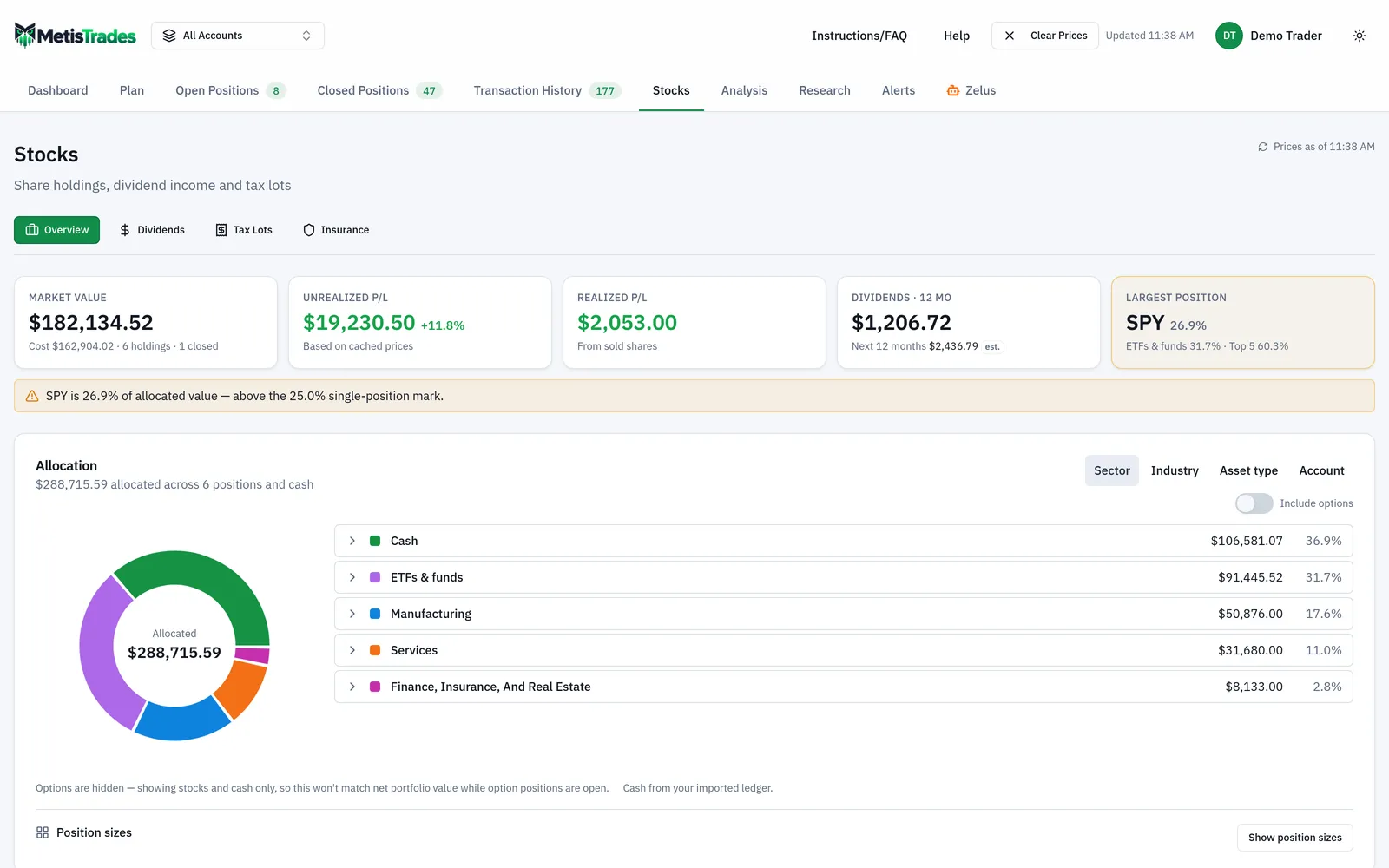
On Stocks — Overview, the Shares column shows purchased shares and transferred shares for each holding, and allocation counts transferred shares as owned shares. The screen below is where you first see cost basis sitting next to value; look for holdings where the two do not line up the way you expect, because that is usually transferred stock with no cost attached yet.
Open the symbol and find "Transfers in"
From Stocks — Overview, open the row for the symbol. Stock Research has sections for "Transfers in," "Cost basis," and "Open lots" for that one ticker. Under Transfers in, each stock transfer shows its date, its share quantity, and either the saved basis per share or basis missing. That is your worklist: every line marked basis missing is a row from your spreadsheet that has not been entered yet.
Enter the cost basis
Choose Enter cost basis on a transfer that has no entry. The dialog is titled Enter transfer cost basis. The Shares field starts with the quantity from that transfer. Enter the number of shares the basis applies to and the original Cost/share from your previous broker — not the market price on the transfer date. The dialog displays Total cost basis as cost per share multiplied by shares, which is your arithmetic check: for the XYZ row, 100 shares at 38 should read 3,800. Both Shares and Cost/share must be positive values. Choose Save cost basis to record it, or Cancel to close without saving.
If an entry already exists, the control reads Edit cost basis, and you can save replacement values when you find the real confirmation. Clear removes an existing entry. Saving or clearing refreshes stock research, holdings, tax lots and account data, so you do not have to rebuild anything downstream.
How the entry is scoped
The saved entry is tied to that specific transfer when its transaction is known, and it is scoped to the transfer's own trading account. If the transfer transaction has no account attached, the current account scope is used when available. This matters in All Accounts mode: basis entered for a transfer of one symbol in one account does not fund transferred shares of the same symbol in another account. Each transfer gets its own entry.
Reaching the signed-in Stocks Overview and Stock Research surfaces requires Pro. The signed-in account owner is the one who can enter, edit or clear transfer basis; someone opening a public share link sees read-only holdings and tax-lot results and cannot edit them. Anonymous uploaded-file sessions cannot save transfer cost-basis entries, so if you are working in one, do the entry work after signing in.
How to read the results
Once an entry is saved, the entered transfer cost is added to the remaining purchased cost. Total cost is the remaining purchased-lot cost plus the entered original cost for transferred shares covered by basis entries. In the worked example, if XYZ and ABC had no prior purchased lots in the account, total cost across the two becomes the 6,850 you supplied.
Average cost is total cost divided by all remaining shares that have a known basis — a weighted average across purchased shares and transferred shares with entered basis. Shares still marked basis missing are not in that average, so average cost describes the shares you have documented, not necessarily every share you own.
The distinction between two headline numbers is the one to internalise:
- Market Value is the latest available price multiplied by all owned shares, including transferred shares whose basis is still missing.
- Unrealized P/L applies the latest available price only to shares with known basis, minus their total cost.
So before you enter anything, a transferred position can show full market value and no unrealized figure. That is not a bug; it is the app declining to invent a cost. After you enter 100 shares of XYZ at $38, those shares start contributing to the unrealized figure — $1,400 at a $52 price, matching the spreadsheet. Clearing the entry puts the shares back to missing basis, and basis-dependent figures stop including them while market value still does.
Transferred shares also count in stock collateral for cash, margin and buying power when a latest available price exists, whether or not basis has been entered — collateral depends on what the shares are worth now, not what you paid.
Stocks — Tax Lots is where the open lots are listed, with transferred lots marked and "basis missing" shown when needed. Look at the lots that came from the transfer and note what the report had to assume about timing: because MetisTrades cannot infer the original acquisition date from an ACAT transfer row, the tax-lot report uses the transfer date as the holding-period start.
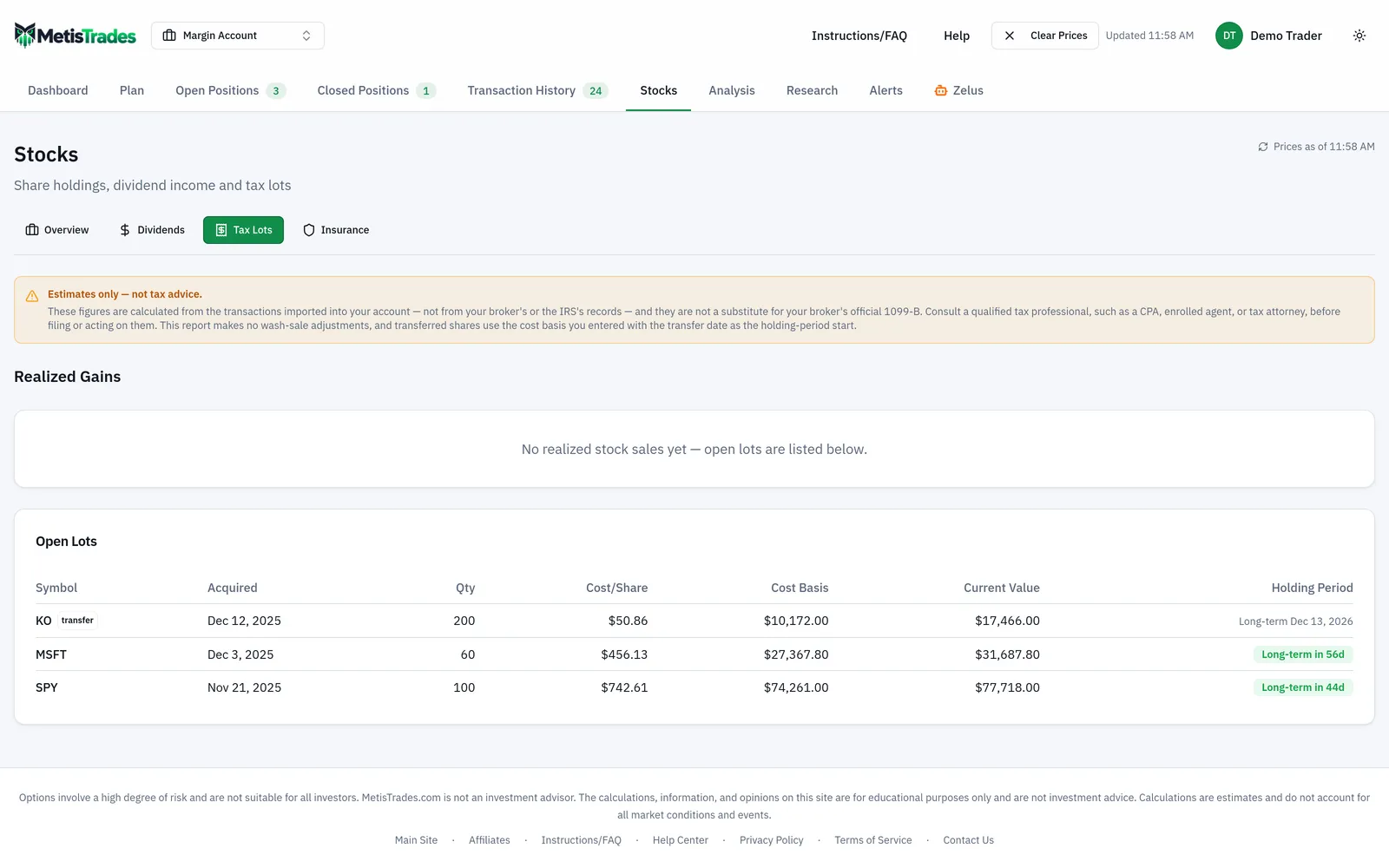
That is exactly why the last column of your spreadsheet exists. The report starting XYZ's clock on 2026-01-20 does not change the fact that you bought the shares on 2023-05-10; it means your own record is the place that fact lives. Keep the sheet alongside the app for any position where the difference between short-term and long-term treatment is material.
Two further limits are worth stating plainly. There are no wash-sale adjustments — the rule that can defer a loss when you buy back a substantially identical security within the relevant window is not applied. And cost basis, realized gains and tax-lot figures are estimates built from your imported transactions, not tax advice and not a substitute for your broker's 1099-B; check them against the official forms and talk to a qualified tax professional before filing. If delayed quotes are unavailable, market value may be unavailable, or another surface may fall back to known invested cost.
Common mistakes
- Entering the market price on the transfer date instead of the original purchase price. It is the easiest number to find and the wrong one — it erases every dollar of gain or loss from before the move. Fix: use the cost per share from the previous broker's confirmation or statement, which is what the dialog asks for.
- Typing the total cost into the Cost/share field. The dialog multiplies Shares by Cost/share, so $3,800 entered as a per-share figure becomes $380,000 of basis. Fix: check the Total cost basis readout before saving; for XYZ it should show 3,800.
- Assuming your holding period starts at the original buy date everywhere. The tax-lot report uses the transfer date as the holding-period start because the original date is not in the transfer row. Fix: keep the original buy dates in your own worksheet and use them when the short-term versus long-term distinction matters.
- Entering basis once while in All Accounts and assuming it covers the ticker everywhere. An entry is tied to a specific transfer and scoped to that transfer's trading account. Fix: enter basis against each transfer individually, in the account that received it.
- Covering only part of a transfer and treating the unrealized figure as complete. Basis applies only to the share quantity you entered; the rest stays missing. Fix: enter the full transferred quantity, or note that unrealized P/L excludes the uncovered shares.
- Comparing market value with total cost and calling the difference your gain. Market value includes shares with missing basis; unrealized P/L does not. Fix: clear every "basis missing" line before you read the two numbers against each other.
- Waiting until you need the number before retrieving the old records. Closed accounts and lapsed logins make a five-minute lookup into a support ticket. Fix: download the old broker's cost-basis report in the same week the transfer settles.
Related guides and help pages
Related guides
- Cost basis and tax lots: tracking what each block of shares actually cost
- Premium-Adjusted Cost Basis for Covered-Call Holders
- Seeing your stock holdings in one place: value, sector, account and income
- Tracking dividend income: received payments vs projected ones
- Protecting a Stock Position With Options: Hedges by Goal and Budget